



Skip to content
View in the app

A better way to browse. Learn more.

WRobot

A full-screen app on your home screen with push notifications, badges and more.

To install this app on iOS and iPadOS
  1. Tap the Share icon in Safari
  2. Scroll the menu and tap Add to Home Screen.
  3. Tap Add in the top-right corner.
To install this app on Android
  1. Tap the 3-dot menu (⋮) in the top-right corner of the browser.
  2. Tap Add to Home screen or Install app.
  3. Confirm by tapping Install.

[Cataclysm] Visit trainer only if there are spells to be trained

  • Product: WRobot General
  • Type: Suggestion
  • Status: Unconfirmed

Currently the bot may visit a class trainer even if there is no spell to be trained. It would be nice if in Cataclysm the bot would take into account the spell book information while deciding if it should visit the trainer or not:
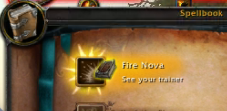
image.png.b0cc9001d231ca89ab39d9d591017990.png


I guess the training state could be cancelled via "robotManager.Events.FiniteStateMachineEvents.OnBeforeCheckIfNeedToRunState", but I don't see any method in the Spell/SpellInfo/SpellManger that could return if a method is 'learnable' - is this something that can be added to the API ? (and maybe throw an error on other expansions, since WoTLK and lower would need static lists, and MoP and higher don't have training anymore).

User Feedback

Recommended Comments

Hashira

Elite user
(edited)

This can be retrieved if you are at a trainer via https://wowwiki-archive.fandom.com/wiki/API_GetTrainerServiceInfo but ideally we won't travel there at all first.


Before visiting the trainer, this is available via the spell book API:

https://wowpedia.fandom.com/wiki/API_GetSpellBookItemInfo - this requires one to walk the whole book, the link contains information about this. `FUTURESPELL` spells are the ones that may be trained in the future.

Then the API GetSpellAvailableLevel can retrieve from which level that particular spell can be used. This one can then be used to decide if the spell can be trained.


See https://www.townlong-yak.com/framexml/4.3.4/SpellBookFrame.lua#640 for the client side logic.

Edited by Hashira

Create an account or sign in to comment

Account

Navigation

Search

Search

Configure browser push notifications

Chrome (Android)
  1. Tap the lock icon next to the address bar.
  2. Tap Permissions → Notifications.
  3. Adjust your preference.
Chrome (Desktop)
  1. Click the padlock icon in the address bar.
  2. Select Site settings.
  3. Find Notifications and adjust your preference.