



Skip to content
View in the app

A better way to browse. Learn more.

WRobot

A full-screen app on your home screen with push notifications, badges and more.

To install this app on iOS and iPadOS
  1. Tap the Share icon in Safari
  2. Scroll the menu and tap Add to Home Screen.
  3. Tap Add in the top-right corner.
To install this app on Android
  1. Tap the 3-dot menu (⋮) in the top-right corner of the browser.
  2. Tap Add to Home screen or Install app.
  3. Confirm by tapping Install.

Skip indoor Node Settings doesn't do anything on Product Settings Page

  • Version: All
  • Product: WRobot General
  • Type: Bug
  • Status: Cannot Reproduce

I noticed that under Product Settings there is a Skip indoor Nodes button.
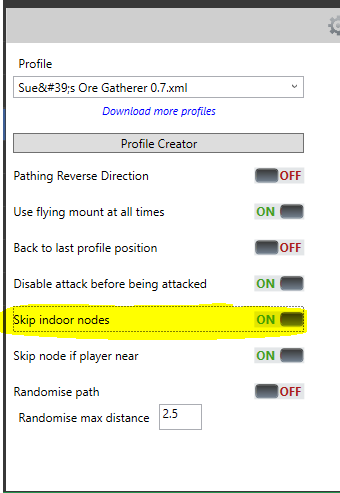
Skip-Indoor-Nodes-ProductSettings.PNG.ac2d4aa6cd128c02203e1e0f42a138ca.PNG

There is also a setting for this in Advanced Settings
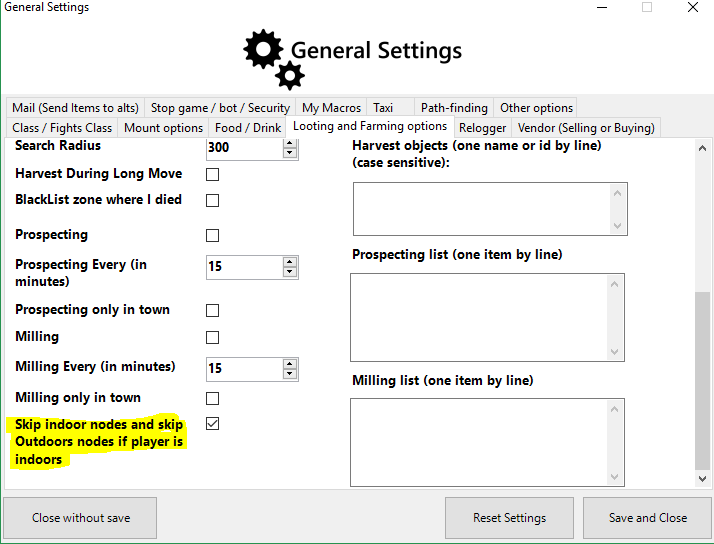
Skip-Indoor-Nodes-AdvancedSettings.PNG.2dec7c8baea75765e068df2fe611be5b.PNG


If i change the Product Settings to True, and leave the Advanced Settings to False, the below code always returns False.

wManager.wManagerSetting.CurrentSetting.SkipInOutDoors

It seems like the Product Setting is not updating the WManagerSetting Settings / Advanced Settings. Please either remove the option on the Gatherer Product Setting, or make sure it updates the value no matter where you set it.

I tested for Burning Crusade and Retail. The issue exists in both versions.

User Feedback

Recommended Comments

Avvi

Members

The one in Advanced Settings does work correctly.

Create an account or sign in to comment

Account

Navigation

Search

Search

Configure browser push notifications

Chrome (Android)
  1. Tap the lock icon next to the address bar.
  2. Tap Permissions → Notifications.
  3. Adjust your preference.
Chrome (Desktop)
  1. Click the padlock icon in the address bar.
  2. Select Site settings.
  3. Find Notifications and adjust your preference.