




Skip to content
View in the app

A better way to browse. Learn more.

WRobot

A full-screen app on your home screen with push notifications, badges and more.
To install this app on iOS and iPadOS
  1. Tap the Share icon in Safari
  2. Scroll the menu and tap Add to Home Screen.
  3. Tap Add in the top-right corner.
To install this app on Android
  1. Tap the 3-dot menu (⋮) in the top-right corner of the browser.
  2. Tap Add to Home screen or Install app.
  3. Confirm by tapping Install.

[A] Westfall 13 - 18 by slk 1.0.0

(0 reviews)

1 Screenshot

Hello!

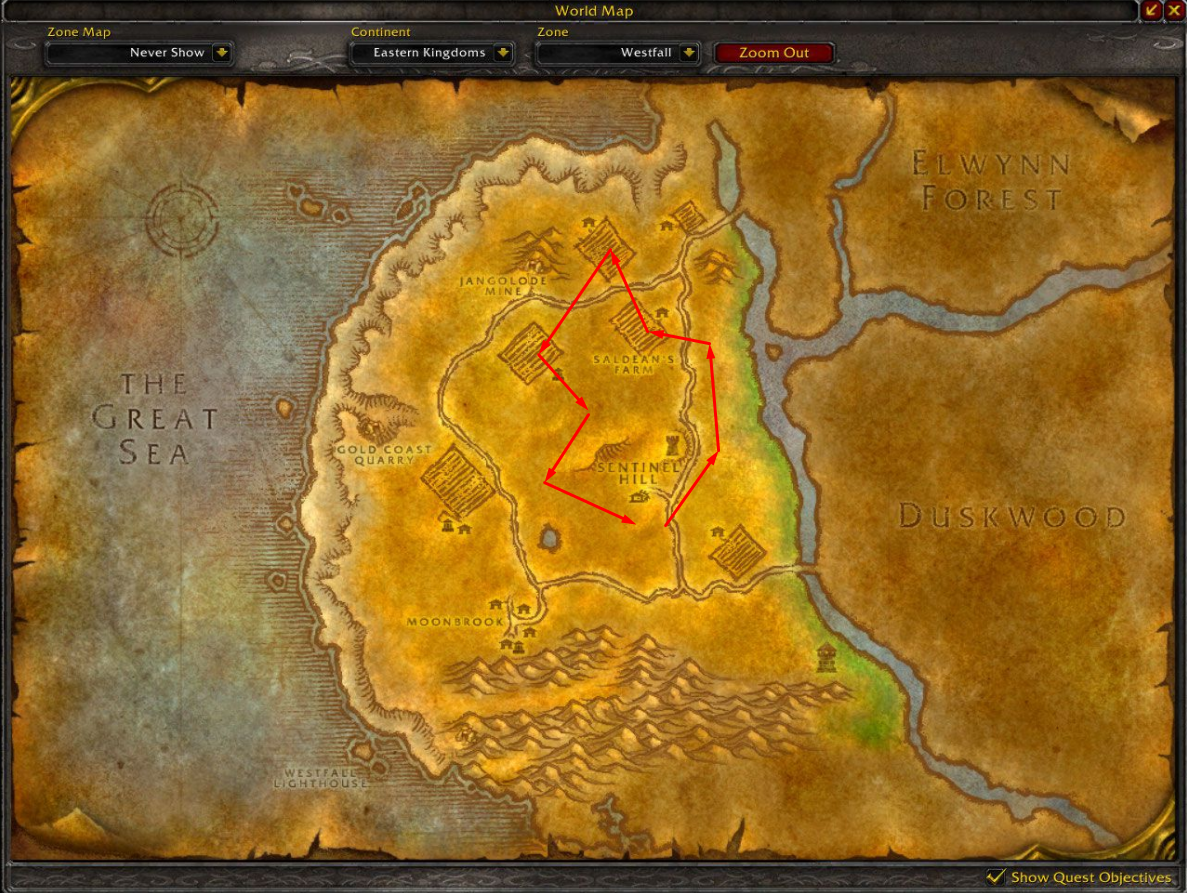
Alliance Westfall grinder profile 13 - 18 (possibly could do more).

Got repair/sell vendors & mailbox support.

Areas of farm you can see on the pic.

You are welcome to submit any feedback.

You may be interested in next zone grinding profile:


User Feedback

Recommended Comments

Paultimate

Members

Cool i love having my bots run where many people and quests are. Ill run this one next time I want to get banned. 

slk

WRobot user

On 11/6/2018 at 7:04 AM, Paultimate said:

Cool i love having my bots run where many people and quests are. Ill run this one next time I want to get banned. 

That's why I highlighted areas of farm.
Do your own or find another one.
Peace.

Create an account or sign in to comment

Account

Navigation

Search

Search

Configure browser push notifications

Chrome (Android)
  1. Tap the lock icon next to the address bar.
  2. Tap Permissions → Notifications.
  3. Adjust your preference.
Chrome (Desktop)
  1. Click the padlock icon in the address bar.
  2. Select Site settings.
  3. Find Notifications and adjust your preference.