




Skip to content
View in the app

A better way to browse. Learn more.

WRobot

A full-screen app on your home screen with push notifications, badges and more.

To install this app on iOS and iPadOS
  1. Tap the Share icon in Safari
  2. Scroll the menu and tap Add to Home Screen.
  3. Tap Add in the top-right corner.
To install this app on Android
  1. Tap the 3-dot menu (⋮) in the top-right corner of the browser.
  2. Tap Add to Home screen or Install app.
  3. Confirm by tapping Install.

Fyuri13

Members
  • Joined

  • Last visited

Everything posted by Fyuri13

  1. I am trying to make a Quester profile to turn in Lunkers to Nt pagle in my Garrison. I got to the point where it'll go to him, interact, then it does nothing because there are 8 different quests to choose from. How do I get the bot to choose the quest i need to turn in? ie: Fire Ammonite Lunker. if I click on that manually it'll finish and complete the quest, but i'm stuck on getting the bot to choose the quest Nat Pagle Fire Ammonite.xml
  2. The no DX option seems to have worked for my situation
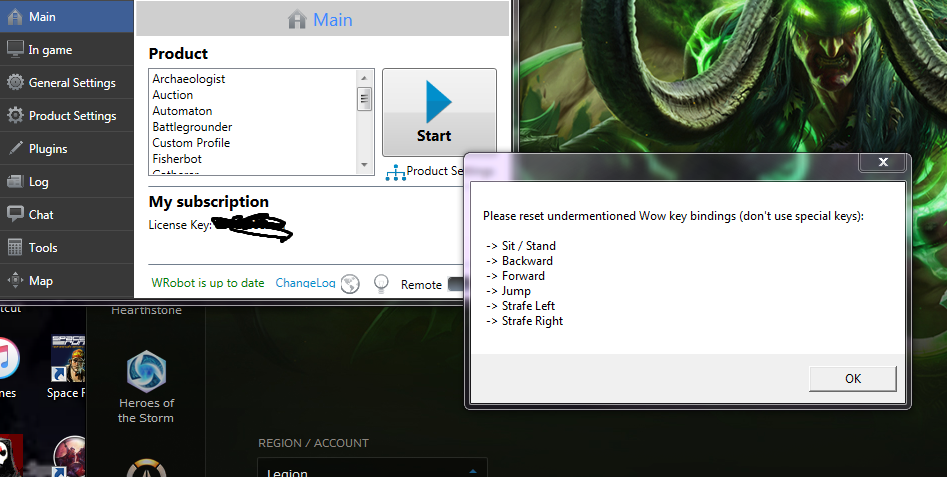
  3. My WoW client started crashing today every time i try to log in to Wrobot.What do i do? None of my settings have changed so I dont understand why its telling me to reset keybindings. 7 May 2016 01H23.log.html
Account

Navigation

Search

Search

Configure browser push notifications

Chrome (Android)
  1. Tap the lock icon next to the address bar.
  2. Tap Permissions → Notifications.
  3. Adjust your preference.
Chrome (Desktop)
  1. Click the padlock icon in the address bar.
  2. Select Site settings.
  3. Find Notifications and adjust your preference.