



Skip to content
View in the app

A better way to browse. Learn more.

WRobot

A full-screen app on your home screen with push notifications, badges and more.

To install this app on iOS and iPadOS
  1. Tap the Share icon in Safari
  2. Scroll the menu and tap Add to Home Screen.
  3. Tap Add in the top-right corner.
To install this app on Android
  1. Tap the 3-dot menu (⋮) in the top-right corner of the browser.
  2. Tap Add to Home screen or Install app.
  3. Confirm by tapping Install.

teegasus

Members
  • Joined

  • Last visited

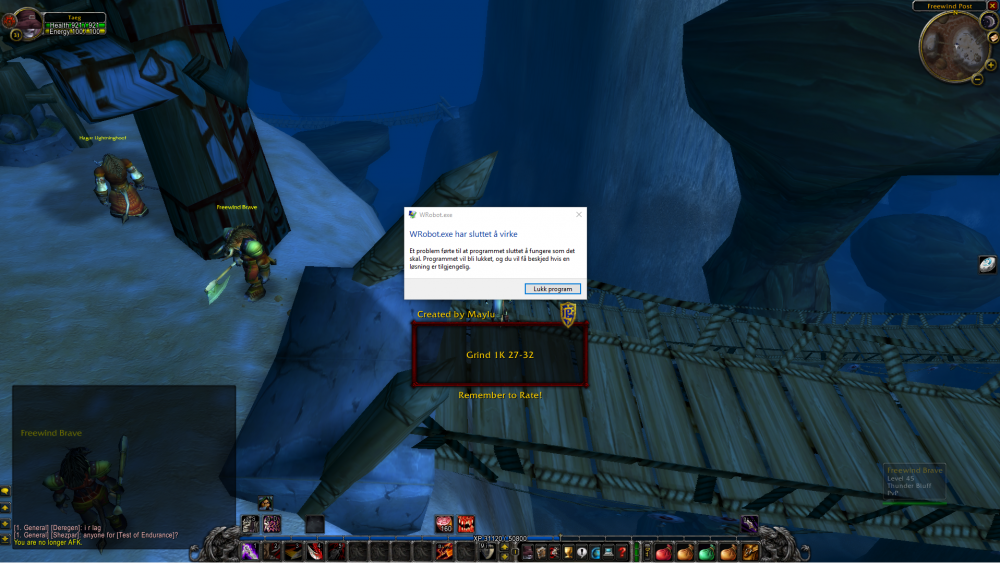
  1. I get this message once I start the bot, everytime. Tried to download and reinstall the bot multiple times. Tried disable all the addons and everything. Any ideas? I am running it on WoW Classic and a Win10 computer.
  2. I'd pay for one, if I could find one. :)
  3. Hey! Are there any official/good working 2.4.3 rogue fight classes out there? I can't seem to find any. Anyway, why does not the WRobot team put some time/money into developing basic official fight classes for every expansion? I think that would help a lot of people out. :) Just a thought. I'd appreciate if someone would share a fight class with me though, want to level a Orc Rogue :)
Account

Navigation

Search

Search

Configure browser push notifications

Chrome (Android)
  1. Tap the lock icon next to the address bar.
  2. Tap Permissions → Notifications.
  3. Adjust your preference.
Chrome (Desktop)
  1. Click the padlock icon in the address bar.
  2. Select Site settings.
  3. Find Notifications and adjust your preference.