gdetonim
Members
-
Joined
-
Last visited
-
yes i understand now, i will buy one license. Maybe it will work, thank you Matenia
-
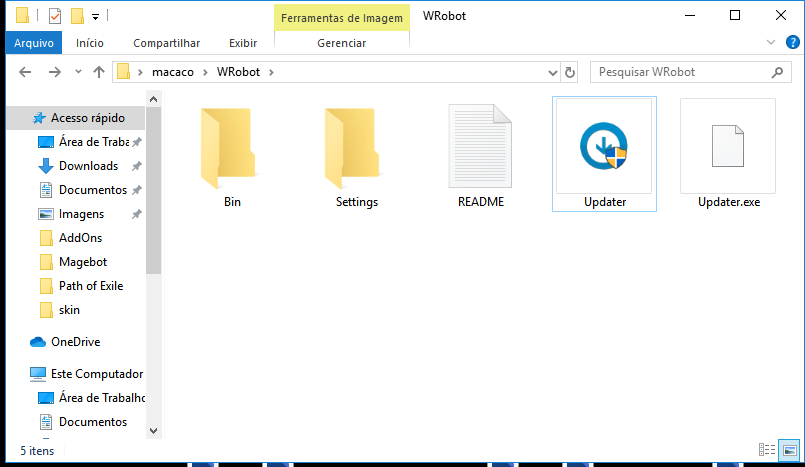
i already made everything to this work it was working yesterday but today its not, it kinda crashes when i try to update/open or edit a script it appears like only "not working" then it pops-up a window telling me that the current version maybe be offline turn off your firewall or antivirus so i get back on the website reinstalled it but i cannot complete the installation here is my folder after i reinstalled it won't even appear the wRobot exec only appears the updater i don't know if the version 3.3.5 its offline or something that is the version i use and i cannot use it anymore because it is bugged or something when i was trying to update for the 3rd time i notice a strange line telling that "06:04:03 - error: System.InvalidOperationException: Erro no documento XML (0, 0). ---> System.Xml.XmlException: Elemento raiz inexistente." another thing i noticed is that i can't take screenshots of this app and why is this so damn heavy now? like not in size but in cpu usage, it almost crashes everytime that i try to update the only thing that appears on my updater its the following "06:04:03 - error: System.Net.WebException: O tempo limite da operação foi atingido em System.Net.HttpWebRequest.GetResponse() em UpdateManager.UpdateManager.GetRequest(String url, String data) 06:04:03 - error: System.InvalidOperationException: Erro no documento XML (0, 0). ---> System.Xml.XmlException: Elemento raiz inexistente. em System.Xml.XmlTextReaderImpl.Throw(Exception e) em System.Xml.XmlTextReaderImpl.ParseDocumentContent() em System.Xml.XmlTextReaderImpl.Read() em System.Xml.XmlTextReader.Read() em System.Xml.XmlReader.MoveToContent() em Microsoft.Xml.Serialization.GeneratedAssembly.XmlSerializationReaderUpdateInfo.Read4_UpdateInfo() --- Fim do rastreamento de pilha de exceções internas ---"