



Skip to content
View in the app

A better way to browse. Learn more.

WRobot

A full-screen app on your home screen with push notifications, badges and more.

To install this app on iOS and iPadOS
  1. Tap the Share icon in Safari
  2. Scroll the menu and tap Add to Home Screen.
  3. Tap Add in the top-right corner.
To install this app on Android
  1. Tap the 3-dot menu (⋮) in the top-right corner of the browser.
  2. Tap Add to Home screen or Install app.
  3. Confirm by tapping Install.

MoveDuringCombat plugin

  • Version: All
  • Product: WRobot General
  • Type: Bug
  • Status: Cannot Reproduce

Hello, each time I open settings for the plugin "MoveDuringCombat"  
this text is automaticly added at the end of the line ( I want to keep only custom settings for moves )
ForwardStart ; Jump ; Wait(300) ; ForwardStop
BackwardStart ; Wait(200) ; BackwardStop
StrafeRightStart ; Wait(500) ; StrafeRightStop
StrafeLeftStart ; ForwardStart ; Wait(500) ; ForwardStop ; StrafeLeftStop
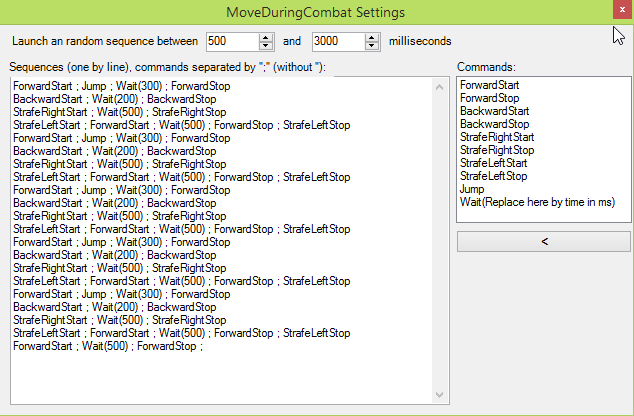

WRobot_2017-12-09_23-23-48.png

User Feedback

Recommended Comments

ScripterQQ

Members

I noticed this too, I can't really create a 100% custom rotation, even editing the xml doesn't work, as soon as u start the robot, the default lines on the xml are replaced on the top of the list, I would really like to delete that move forward + jump honestly and make my own movements. Is there something I am missing?

Create an account or sign in to comment

Account

Navigation

Search

Search

Configure browser push notifications

Chrome (Android)
  1. Tap the lock icon next to the address bar.
  2. Tap Permissions → Notifications.
  3. Adjust your preference.
Chrome (Desktop)
  1. Click the padlock icon in the address bar.
  2. Select Site settings.
  3. Find Notifications and adjust your preference.