




- Version: All
- Product: WRobot General
- Type: Bug
- Status: Not a Bug
[D] 00:40:35 - [信息] 日志文件创建: 30 5月 2023 00H40.log.html
[D] 00:40:35 - [信息] WRobot 版本: 2.8.0 (19808) 对于 WOW: 4.3.4_15595[D] 00:40:35 - [信息] 官方网站: https://wrobot.eu/
[D] 00:40:35 - [信息] 操作系统详细信息: 视窗 10 企业
版[D] 00:40:35
- [信息] 郎: 中文(简体,中国)
[法] 00:40:36 - [内存] 找到 D3D9: 6A 14 B8 B0 1C BC 72 E8 CA 9F
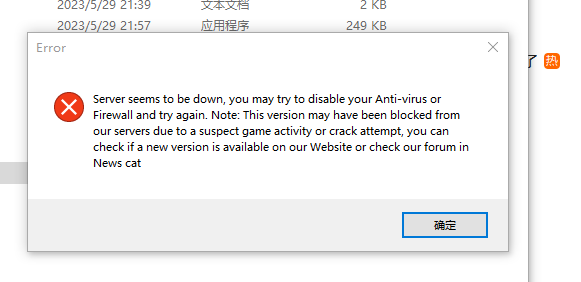
[E] 00:40:36 - GetRequest: https://download.wrobot.eu/wrobotcata/alert.php -> System.Net.Http.HttpRequestException: 发送请求时出错。---> System.Net.WebException: 基础连接已经关闭: 发送时发生错误。---> System.IO.IOException: 无法从传输连接中读取数据: 远程主机强迫关闭了一个现有的连接。。---> System.Net.Sockets.SocketException: 远程主机强迫关闭了一个现有的连接。
在 System.Net.Sockets.Socket.EndReceive(IAsyncResult asyncResult)在 System.Net.Sockets.NetworkStream.EndRead(IAsyncResult asyncResult)--- 内部异常堆栈跟踪的结尾 ---在 System.Net.TlsStream.EndWrite(IAsyncResult asyncResult)在 System.Net.PooledStream.EndWrite(IAsyncResult asyncResult)在 System.Net.ConnectStream.WriteHeadersCallback(IAsyncResult ar)
--- 内部异常堆栈跟踪的结尾 ---
在 System.Net.HttpWebRequest.EndGetResponse(IAsyncResult asyncResult)在 System.Net.Http.HttpClientHandler.GetResponseCallback(IAsyncResult ar)--- 内部异常堆栈跟踪的结尾 ---
在 System.Runtime.CompilerServices.TaskAwaiter.ThrowForNonSuccess(Task task)在 System.Runtime.CompilerServices.TaskAwaiter.HandleNonSuccessAndDebuggerNotification(Task task)
在 robotManager.Help.Others..MoveNext()[F]
00:40:36 - [内存] D3D11 找到: 8B FF 55 8B EC 83 E4 F8 83 EC
[F] 00:40:36 - [内存] D3D9 已使用
[D] 00:40:50 - GetRequest(string url=“https://download.wrobot.eu/wrobotcata/isOnline.php”, string data=“”): System.Net.WebException: 基础连接已经关闭: 发送时发生错误。---> System.IO.IOException: 无法从传输连接中读取数据: 远程主机强迫关闭了一个现有的连接。。---> System.Net.Sockets.SocketException: 远程主机强迫关闭了一个现有的连接。在 System.Net.Sockets.Socket.Receive(Byte[] buffer, Int32 offset, Int32 size, SocketFlags socketFlags)在 System.Net.Sockets.NetworkStream.Read(Byte[] buffer, Int32 offset, Int32 size)--- 内部异常堆栈跟踪的结尾 ---
在 System.Net.Sockets.NetworkStream.Read(Byte[] buffer, Int32 offset, Int32 size)在 System.Net.FixedSizeReader.ReadPacket(Byte[] buffer, Int32 offset, Int32 count)
在 System.Net.Security.SslState.StartReceiveBlob(Byte[] buffer, AsyncProtocolRequest asyncRequest)在 System.Net.Security.SslState.CheckCompletionBeforeNextReceive(ProtocolToken message, AsyncProtocolRequest asyncRequest)在 System.Net.Security.SslState.StartSendBlob(Byte[] incoming, Int32 count, AsyncProtocolRequest asyncRequest, Boolean renegotiation)
在 System.Net.Security.SslState.ForceAuthentication(Boolean receiveFirst, Byte[] buffer, AsyncProtocolRequest asyncRequest, Boolean renegotiation)在 System.Net.Security.SslState.ProcessAuthentication(LazyAsyncResult lazyResult)在 System.Net.TlsStream.CallProcessAuthentication(Object state)
在 System.Threading.ExecutionContext.RunInternal(ExecutionContext executionContext, ContextCallback callback, Object state, Boolean preserveSyncCtx)
在 System.Threading.ExecutionContext.Run(ExecutionContext executionContext, ContextCallback callback, Object state, Boolean preserveSyncCtx)在 System.Threading.ExecutionContext.Run(ExecutionContext executionContext, ContextCallback callback, Object state)在 System.Net.TlsStream.ProcessAuthentication(LazyAsyncResult result)在 System.Net.TlsStream.Write(Byte[] buffer, Int32 offset, Int32 size)在 System.Net.PooledStream.Write(Byte[] buffer, Int32 offset, Int32 size)
在 System.Net.ConnectStream.WriteHeaders(Boolean async)
--- 内部异常堆栈跟踪的结尾 ---
在 System.Net.HttpWebRequest.GetResponse()
--- 引发异常的上一位置中堆栈跟踪的末尾 ---
在 .(Exception )
在 .(Object )
在 .(MethodBase , Boolean )
在 .( )
在 . ( , )
在 . ()
在 . (Boolean )
[E] 00:40:54 - System.Char[]
Recommended Comments
Create an account or sign in to comment