




- Version: All
- Product: WRobot General
- Type: Bug
- Status: Fixed
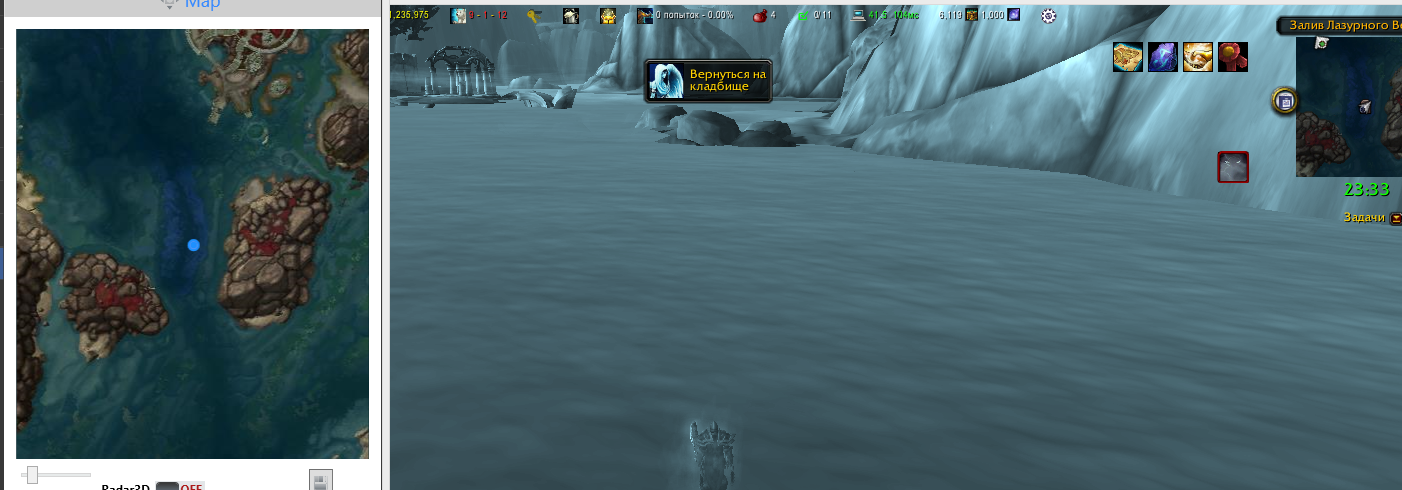
bot cannot swim to body, runned to point beneath body,
coords doesnt matter, died here few times and always bot stuck.
coords and log
Map name MPQ: Troll Raid

My Position: 835.4794, 2196.187, -0.0001324443, "None"
My Position Vector: new Vector3(835.4794, 2196.187, -0.0001324443, "None")
My Position XML: <Vector3 X="835.4794" Y="2196.187" Z="-0.0001324443" Type="None" />
My Rotation: 5,500199
[D] 23:32:19 - [Fight] Fight stopped
23:32:19 - [Resurrect] Player dead
[N] 23:32:24 - [Path-Finding] Partial result: Troll Raid - -2382,7;54,34622;-729,3542 - -2195,985;-99,51943;-835,6821
[N] 23:32:24 - [Path-Finding] Partial result: Troll Raid - -2195,985;-99,51943;-835,6821 - -2280,421;-6,401591;-779,5087
[N] 23:32:24 - [Path-Finding] Path Count: 10
[D] 23:32:36 - [MovementManager] Avoid wall: Jump
23:32:49 - [Resurrect] Player dead
[N] 23:32:54 - [Path-Finding] Path Count: 2
23:32:54 - [Resurrect] Player dead
[N] 23:33:00 - [Path-Finding] Path Count: 2
23:33:00 - [Resurrect] Player dead
[N] 23:33:05 - [Path-Finding] Path Count: 2
23:33:05 - [Resurrect] Player dead
[N] 23:33:10 - [Path-Finding] Path Count: 2
23:33:10 - [Resurrect] Player dead
[N] 23:33:16 - [Path-Finding] Path Count: 2
23:33:16 - [Resurrect] Player dead
[N] 23:33:21 - [Path-Finding] Path Count: 2
23:33:21 - [Resurrect] Player dead
[N] 23:33:26 - [Path-Finding] Path Count: 2
23:33:26 - [Resurrect] Player dead
[N] 23:33:32 - [Path-Finding] Path Count: 2
23:33:32 - [Resurrect] Player dead
[N] 23:33:37 - [Path-Finding] Path Count: 2
23:33:37 - [Resurrect] Player dead
[N] 23:33:42 - [Path-Finding] Path Count: 2
23:33:42 - [Resurrect] Player dead
[N] 23:33:48 - [Path-Finding] Path Count: 2
23:33:48 - [Resurrect] Player dead
[N] 23:33:53 - [Path-Finding] Path Count: 2
23:33:53 - [Resurrect] Player dead
[N] 23:33:58 - [Path-Finding] Path Count: 2
23:33:58 - [Resurrect] Player dead
[N] 23:34:04 - [Path-Finding] Path Count: 2
23:34:04 - [Resurrect] Player dead
[N] 23:34:09 - [Path-Finding] Path Count: 2
23:34:09 - [Resurrect] Player dead
[N] 23:34:14 - [Path-Finding] Path Count: 2
23:34:14 - [Resurrect] Player dead
[N] 23:34:20 - [Path-Finding] Path Count: 2
23:34:20 - [Resurrect] Player dead
[N] 23:34:25 - [Path-Finding] Path Count: 2
23:34:25 - [Resurrect] Player dead
[N] 23:34:30 - [Path-Finding] Path Count: 2
23:34:30 - [Resurrect] Player dead
[N] 23:34:36 - [Path-Finding] Path Count: 2
23:34:36 - [Resurrect] Player dead
[N] 23:34:41 - [Path-Finding] Path Count: 2
23:34:41 - [Resurrect] Player dead
[N] 23:34:46 - [Path-Finding] Path Count: 2
23:34:46 - [Resurrect] Player dead
[N] 23:34:52 - [Path-Finding] Path Count: 2
23:34:52 - [Resurrect] Player dead
[N] 23:34:57 - [Path-Finding] Path Count: 2
23:34:57 - [Resurrect] Player dead
[N] 23:35:02 - [Path-Finding] Path Count: 2
23:35:03 - [Resurrect] Player dead
[N] 23:35:08 - [Path-Finding] Path Count: 2
23:35:08 - [Resurrect] Player dead
[N] 23:35:13 - [Path-Finding] Path Count: 2
23:35:13 - [Resurrect] Player dead
[N] 23:35:18 - [Path-Finding] Path Count: 2
23:35:19 - [Resurrect] Player dead
[N] 23:35:24 - [Path-Finding] Path Count: 2
23:35:24 - [Resurrect] Player dead
[N] 23:35:29 - [Path-Finding] Path Count: 2
23:35:29 - [Resurrect] Player dead
[N] 23:35:34 - [Path-Finding] Path Count: 2
23:35:35 - [Resurrect] Player dead
Recommended Comments
Create an account or sign in to comment