




Skip to content
View in the app

A better way to browse. Learn more.

WRobot

A full-screen app on your home screen with push notifications, badges and more.

To install this app on iOS and iPadOS
  1. Tap the Share icon in Safari
  2. Scroll the menu and tap Add to Home Screen.
  3. Tap Add in the top-right corner.
To install this app on Android
  1. Tap the 3-dot menu (⋮) in the top-right corner of the browser.
  2. Tap Add to Home screen or Install app.
  3. Confirm by tapping Install.

weird error message

  • Product: WRobot General
  • Type: Bug
  • Status: Fixed

after i hit start,

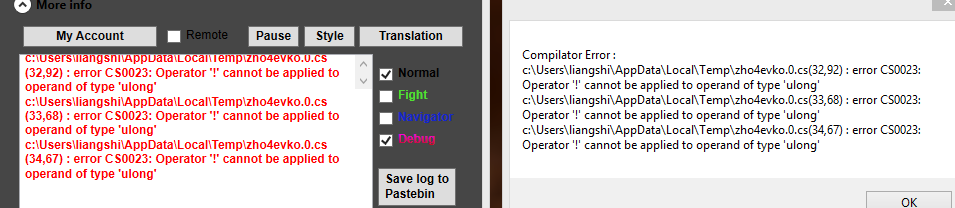
follow message poped

and i need to click yes

and then the bot start to move

but, the bot will not use ability or anything expect move towards target and autoattack still dead.

it was working great.


Attached Files:
User Feedback

Recommended Comments

zjxlsmr

Elite user

it should be something about my fightclass.


i edited it abit and then everything goes wrong.


what i did is:


i added a condition called" Target Buff Casted By me"


i was looking for "target debuff" 


but seems like "debuff" is treated as same as "buff"


and "target buff" does works


(i was intent to apply debuff on target that i only need to maintain)


so pls check the condition "target buff casted by me"


and still confuse what is that mean. Does that means i casted a "buiff" on friendly target?


or in this case "buff" means same with "debuff"

Hello thanks,


I have fixed problem, wait the next update. (problem is caused by "... Buff Casted By me" if don't need).

Create an account or sign in to comment

Account

Navigation

Search

Search

Configure browser push notifications

Chrome (Android)
  1. Tap the lock icon next to the address bar.
  2. Tap Permissions → Notifications.
  3. Adjust your preference.
Chrome (Desktop)
  1. Click the padlock icon in the address bar.
  2. Select Site settings.
  3. Find Notifications and adjust your preference.