



Skip to content
View in the app

A better way to browse. Learn more.

WRobot

A full-screen app on your home screen with push notifications, badges and more.

To install this app on iOS and iPadOS
  1. Tap the Share icon in Safari
  2. Scroll the menu and tap Add to Home Screen.
  3. Tap Add in the top-right corner.
To install this app on Android
  1. Tap the 3-dot menu (⋮) in the top-right corner of the browser.
  2. Tap Add to Home screen or Install app.
  3. Confirm by tapping Install.

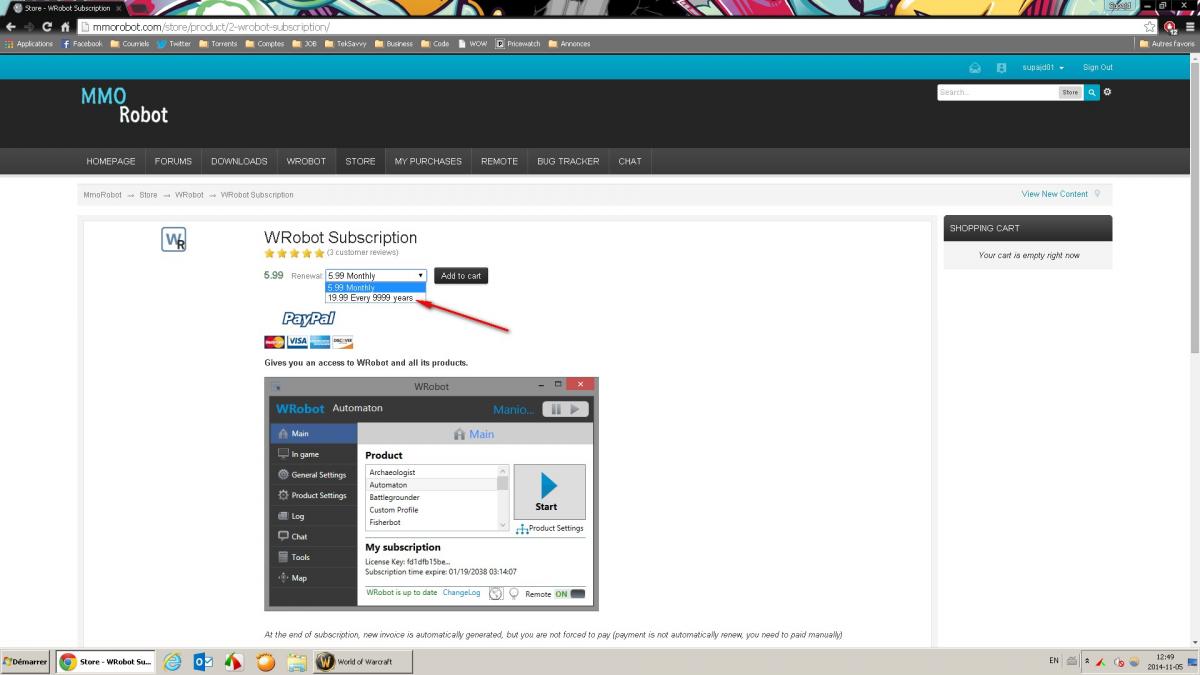
When choosing recurring payment, then dropdown choices arent right

  • Product: WRobot General
  • Type: Bug
  • Status: Not a Bug

Hi,

It seem like the wrobot recurring payment type is buggy for the second choice.

It is written 19.99 for 9999 years.

Shouldnt be 29.99 for 1 year?

Thanks


Attached Files:
User Feedback

Recommended Comments

creativextent

Elite user

Hello

I do not see this.


I see 29.99 for 1 year and 39.99 for lifetime!


Check again. maybe he had a sale :)

Jdpower

Members
 
WRobot Subscription star.png star.png star.png star.png star.png  

5.99   
Renewal:  5.99 Monthly   19.99 Every 9999 years 


It should be 39.99 for 9999 years!

Jdpower

Members

I think it because of the currency.

Jdpower

Members

Got it!

I didnt noticed the 1 session notice.

Thanks!

Jdpower

Members

Why is the default currency set to Euro?

It is determined by client culture?

Create an account or sign in to comment

Account

Navigation

Search

Search

Configure browser push notifications

Chrome (Android)
  1. Tap the lock icon next to the address bar.
  2. Tap Permissions → Notifications.
  3. Adjust your preference.
Chrome (Desktop)
  1. Click the padlock icon in the address bar.
  2. Select Site settings.
  3. Find Notifications and adjust your preference.