



Skip to content
View in the app

A better way to browse. Learn more.

WRobot

A full-screen app on your home screen with push notifications, badges and more.

To install this app on iOS and iPadOS
  1. Tap the Share icon in Safari
  2. Scroll the menu and tap Add to Home Screen.
  3. Tap Add in the top-right corner.
To install this app on Android
  1. Tap the 3-dot menu (⋮) in the top-right corner of the browser.
  2. Tap Add to Home screen or Install app.
  3. Confirm by tapping Install.

Wow crashes after starting bot

  • Product: WRobot General
  • Type: Bug
  • Status: Unconfirmed

My wow always crashing after starting bot.

Just using a clean 2.4.3, whenever I start the bot it just crashes the game
Also using it on a 3.3.5 and no probs there.

I do have wrobot installed twice, 2 defferent maps, one for tbc and one for wotlk, woul this give an error?
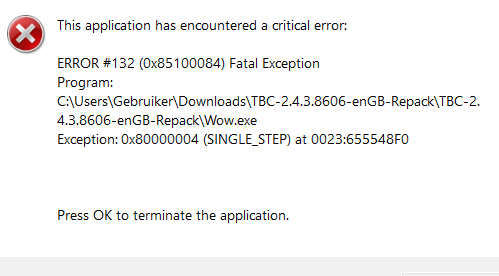
image.png.b6b16d4124984656d11c77bae362293c.png

User Feedback

Recommended Comments

piemelmans555

Members

It seems everything works except the quester profile (tested multiple quester files)
whenever I start quester it breaks.
For example no issues when I use automaton


piemelmans555

Members

NVM grinder also won't work


piemelmans555

Members

it seems no profile works, although if i set automaton the plugins it does


piemelmans555

Members

For extra details/info just used partybot for a while and the bot + plugins work perfectly, so I wonder what it could be

REMINDER that I use it on a 3.3.5 server aswell and everything works smoothly on that one


4mkjp4uh

WRobot user

Strangely enough, I've been having the same problem for days now.
But there's no error message—WoW (WotLK) just closes on its own.
Sometimes I can let the bot run for 4 hours—other times, only 10 minutes.
It doesn't matter if I'm grinding or doing quests.
 

piemelmans555

Members

indd strange, for me it's just whenever I activate the bot with a profile (quester/grinder) it automatically crashes my wow and closes WRobot itself so I can't check any logs to see what happens. Now been running automaton and party and these are working fine but a fightclass and 2 plugins, so it's odd 


piemelmans555

Members

with some help of the error logs and chatgpt
image.png.0a70c024c82784d78a3a966d34749b1b.png

Can I fix this with downloading vulkan?


piemelmans555

Members

gatherer works so might be that profiles like grinder and quester give too many commands/injections making the client crash out

piemelmans555

Members

@Droidz sorry to bother but I'd really like to be able to use the bot to it's full extent


Hello,

Your client path shows "TBC-2.4.3.8606-enGB-Repack" - repacks are often slightly modified clients (even if they look "clean"), and that's very likely what's causing the crash.

Try to find an original unmodified 2.4.3 client (not a repack) and test with that. That should fix it.

No, Vulkan won't help here, the issue is at the memory/hook level, not graphics related.

piemelmans555

Members
On 3/31/2026 at 5:28 PM, Droidz said:

Hello,

Your client path shows "TBC-2.4.3.8606-enGB-Repack" - repacks are often slightly modified clients (even if they look "clean"), and that's very likely what's causing the crash.

Try to find an original unmodified 2.4.3 client (not a repack) and test with that. That should fix it.

No, Vulkan won't help here, the issue is at the memory/hook level, not graphics related.

I got a clean 2.4.3 client and I still get crashesimage.png.69bfb52c7fc5c6db779e735751a80283.png


Or is there a website you recommend for a clean client?

piemelmans555

Members

might it be a driver issue?


piemelmans555

Members
8 minutes ago, Droidz said:

Try to use the shortcut "WRobot (DX hook)" to launch the bot.

Tried it, automaton,gatherer, party works fine

But whenever I try to load in a profile on quester or grinder (tried diff ones) it crashes


The last possibility is that it's caused by a wrobot plugin or the fight class. Otherwise, I'm sorry, I don't know what could cause this type of problem.

Create an account or sign in to comment

Account

Navigation

Search

Search

Configure browser push notifications

Chrome (Android)
  1. Tap the lock icon next to the address bar.
  2. Tap Permissions → Notifications.
  3. Adjust your preference.
Chrome (Desktop)
  1. Click the padlock icon in the address bar.
  2. Select Site settings.
  3. Find Notifications and adjust your preference.