



Skip to content
View in the app

A better way to browse. Learn more.

WRobot

A full-screen app on your home screen with push notifications, badges and more.

To install this app on iOS and iPadOS
  1. Tap the Share icon in Safari
  2. Scroll the menu and tap Add to Home Screen.
  3. Tap Add in the top-right corner.
To install this app on Android
  1. Tap the 3-dot menu (⋮) in the top-right corner of the browser.
  2. Tap Add to Home screen or Install app.
  3. Confirm by tapping Install.

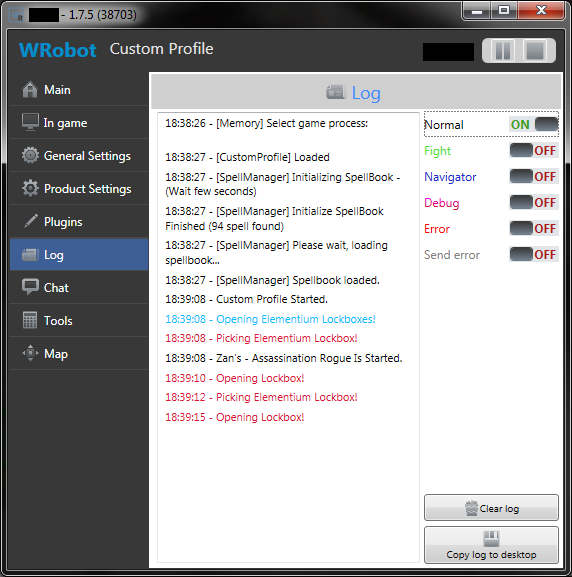
1 Screenshot

I wrote this to open various lockboxes I had in my guild vault with my Level 110 Rogue and I thought I'd share it. Simply load up all your lockboxes into your Rogues bags, load the Custom Profile, and hit start. Leave space in your bags to open them. There is no level check to see if you can open the lockboxes at this time. Let me know if it's not working for certain lockboxes and I'll update it. I wrote and tested this using Live servers. It may work on previous versions of WoW but I am unable to test it on those. This profile will ONLY run under Custom Profile. Therefore, you will need to Create a Custom Profile Folder. It should look like this: WRobot > Profiles > Custom Profile > Open Lockboxes.dll

User Feedback

You may only provide a review once you have downloaded the file.

There are no reviews to display.

Account

Navigation

Search

Search

Configure browser push notifications

Chrome (Android)
  1. Tap the lock icon next to the address bar.
  2. Tap Permissions → Notifications.
  3. Adjust your preference.
Chrome (Desktop)
  1. Click the padlock icon in the address bar.
  2. Select Site settings.
  3. Find Notifications and adjust your preference.