



Skip to content
View in the app

A better way to browse. Learn more.

WRobot

A full-screen app on your home screen with push notifications, badges and more.

To install this app on iOS and iPadOS
  1. Tap the Share icon in Safari
  2. Scroll the menu and tap Add to Home Screen.
  3. Tap Add in the top-right corner.
To install this app on Android
  1. Tap the 3-dot menu (⋮) in the top-right corner of the browser.
  2. Tap Add to Home screen or Install app.
  3. Confirm by tapping Install.

[N] Zul'Drak 74 - 80 by slk 2.0.0

(3 reviews)

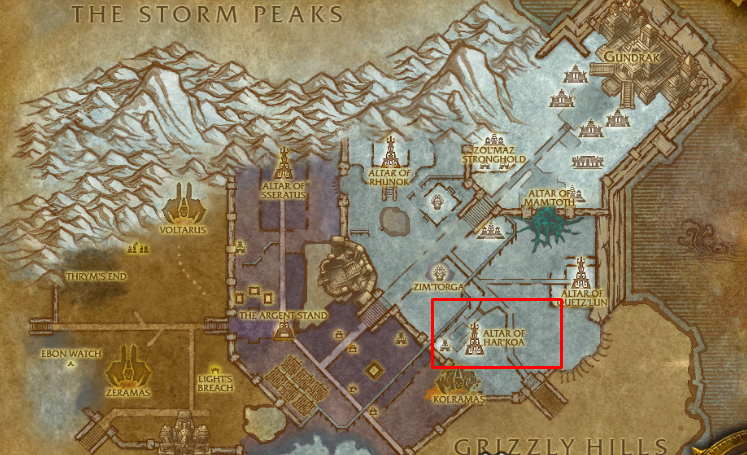
1 Screenshot

Hello!

Neutral Zul'Drak grinder profile 74 - 80.

I was using this profile for dinging bots to lvl 80 after couple days of Borean Tundra farm.

Got repair/sell vendor & mailbox support.

Areas of farm you can see on the pics.

You are welcome to submit any feedback.

P.S.
I've been using this profile for loads of characters and not only for leveling, but also for gold-farming.

Average farming stats:
6 hours

2k - 3.5k gold from grays/whites/greens/blues.


What's New in Version 2.0.0

Released

User Feedback

You may only provide a review once you have downloaded the file.


Thanks..

Using right now with a druid cat.. started on 77 around 7 hours ago. no problems at all..  


   1 of 2 members found this review helpful 1 / 2 members

works perfect!

Response from the author:

Glad you like it!

Account

Navigation

Search

Search

Configure browser push notifications

Chrome (Android)
  1. Tap the lock icon next to the address bar.
  2. Tap Permissions → Notifications.
  3. Adjust your preference.
Chrome (Desktop)
  1. Click the padlock icon in the address bar.
  2. Select Site settings.
  3. Find Notifications and adjust your preference.
