




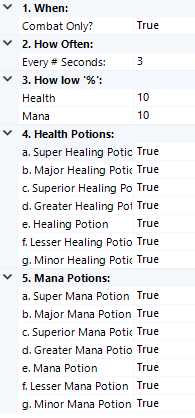

Automatically uses HEALTH and MANA potions when specified.
Uses level appropriate potion unless you do not have any of those, and if you do not it will start trying lower grade potions.
Health Potions:
- Super Healing Potion
- Major Healing Potion
- Superior Healing Potion
- Greater Healing Potion
- Healing Potion
- Lesser Healing Potion
- Minor Healing Potion
Mana Potions:
- Super Mana Potion
- Major Mana Potion
- Superior Mana Potion
- Greater Mana Potion
- Mana Potion
- Lesser Mana Potion
- Minor Mana Potion
Plugin has settings to customize usage of potions. (See Screenshot)
How to use :
Add the UsePotionsv2.0.cs file to the Wrobot Plugins folder.
After this, start up bot, go to the tab called "Plugins" and turn "UsePotionsv2.0.cs" on.
After this, start up bot, go to the tab called "Plugins" and turn "UsePotionsv2.0.cs" on.
What's New in Version 2.0.0
Released
Added more potions.

You may only provide a review once you have downloaded the file.
There are no reviews to display.