



Skip to content
View in the app

A better way to browse. Learn more.

WRobot

A full-screen app on your home screen with push notifications, badges and more.

To install this app on iOS and iPadOS
  1. Tap the Share icon in Safari
  2. Scroll the menu and tap Add to Home Screen.
  3. Tap Add in the top-right corner.
To install this app on Android
  1. Tap the 3-dot menu (⋮) in the top-right corner of the browser.
  2. Tap Add to Home screen or Install app.
  3. Confirm by tapping Install.

AllInOne 1.2.1.1

(1 review)

1 Screenshot

Deutsch / English

https://www.virustotal.com/gui/file/d504d04f200e97f9fd6c00b88650815a18a8245d68ba95dbdf7f7f1c813b17ee?nocache=1

d504d04f200e97f9fd6c00b88650815a18a8245d68ba95dbdf7f7f1c813b17ee

---------------

Hi,

ich habe noch aus Piroxzeiten das Addon AllInOne gefunden.

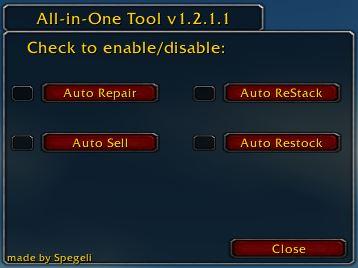
Wie im Screen zu sehen ist kann das Addon

  1. Auto Repair
  2. Auto Sell
  3. Auto ReStock
  4. Auto ReStack

Das Addon ist von Spegeli und nicht von mir, ich lade es nur hoch damit ihr es nutzen könnt.

Vielen Dank an spegeli dafür.


LG

snow21

---------------

English

 Hi,

I have found the addon AllInOne from Pirox times.

As you can see in the screen the addon can do

  1.     Auto Repair
  2.     Auto Sell
  3.     Auto ReStock
  4.     Auto ReStack

The addon is from Spegeli and not from me, I just upload it so you can use it.

Many thanks to spegeli for this.


LG

snow21

User Feedback

You may only provide a review once you have downloaded the file.


Super addon

Account

Navigation

Search

Search

Configure browser push notifications

Chrome (Android)
  1. Tap the lock icon next to the address bar.
  2. Tap Permissions → Notifications.
  3. Adjust your preference.
Chrome (Desktop)
  1. Click the padlock icon in the address bar.
  2. Select Site settings.
  3. Find Notifications and adjust your preference.