



Skip to content
View in the app

A better way to browse. Learn more.

WRobot

A full-screen app on your home screen with push notifications, badges and more.

To install this app on iOS and iPadOS
  1. Tap the Share icon in Safari
  2. Scroll the menu and tap Add to Home Screen.
  3. Tap Add in the top-right corner.
To install this app on Android
  1. Tap the 3-dot menu (⋮) in the top-right corner of the browser.
  2. Tap Add to Home screen or Install app.
  3. Confirm by tapping Install.

[A+H] Arathi Highlands Mining 125-225 1.0.0

(0 reviews)

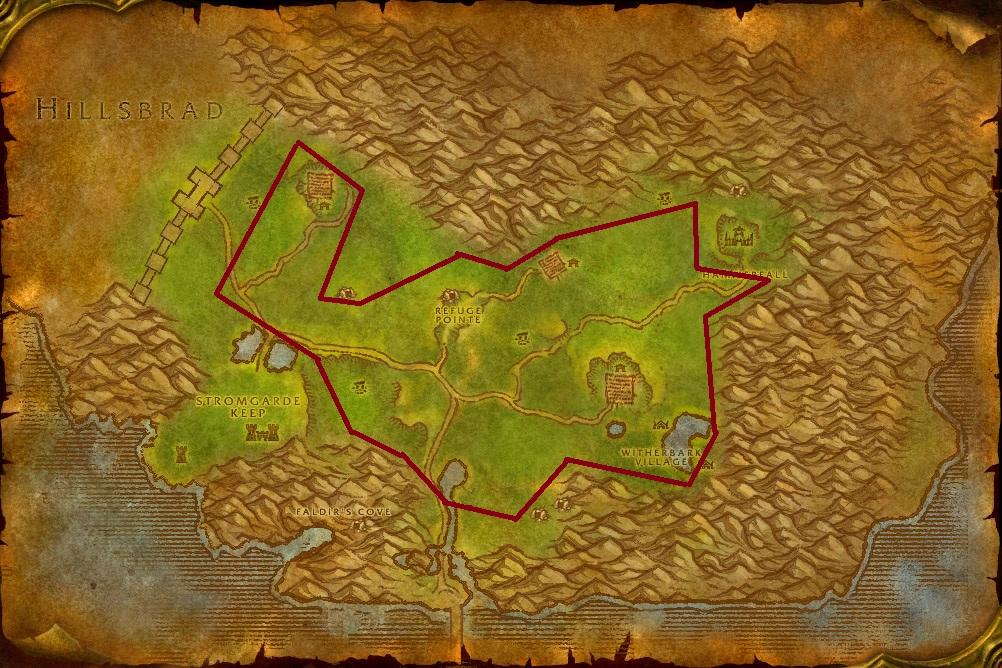
1 Screenshot

  • Recommended character level: +40
  • Recommended mining level: +125
  • Veins available: Tin, Iron, Gold and various other veins
  • Settings: Use search range of 300. You can choose between enabling indoor nodes or not. Not having it enabled is safer but you lose on ores.

Been a while since I uploaded. 6 years haha? But anyways, here's the pathing I used for getting through the 125-225 levels for both mining and blacksmithing. This profile should work for all pre-Cataclysm game versions. I recommend setting bot to stop on full inventory. This profile is not optimized for making profit, use strictly for leveling your professions. Screenshot for the route I used.

User Feedback

You may only provide a review once you have downloaded the file.

There are no reviews to display.

Account

Navigation

Search

Search

Configure browser push notifications

Chrome (Android)
  1. Tap the lock icon next to the address bar.
  2. Tap Permissions → Notifications.
  3. Adjust your preference.
Chrome (Desktop)
  1. Click the padlock icon in the address bar.
  2. Select Site settings.
  3. Find Notifications and adjust your preference.