


Gatherer - Wotlk
55 files
-
🧠 SmartGatherer v1.4.0 – the smart choice for herbing and mining (WotLK 3.3.5a)
SmartGatherer is a gathering product for WRobot. It replaces the stock Gatherer, so you don’t need a separate plugin. You load a normal Gatherer profile and SmartGatherer flies the route, picks the nodes, and watches out for the things that get bots noticed: other players, mobs, GMs and getting stuck.
It works for herbalism and mining. It’s built and tested on WotLK 3.3.5a, mostly farming Storm Peaks.
✈️ It flies like a player
SmartGatherer flies the whole route itself and steers with the mouse, so curves are smooth instead of the usual turn-key wobble. If the game won’t accept mouse steering, it falls back to the keys.
It goes down to nodes nose-first, either in an angled dive or straight down onto the node, and doesn’t sink level holding X.
It goes round mobs rather than over them, and only climbs over when the way round isn’t clear.
Timed route: if nothing on the next stretch will have respawned yet, it cuts across that part of the route.
If a profile isn’t a closed loop, it flies the route out and back.
It doesn’t try to land under roofs or overhangs, or on slopes too steep to stand on.
👀 Players
It only leaves when a player comes close, heads your way, follows you or targets you. Players who are just passing are left alone, and their path is kept clear.
When it does leave, it flies off on the escape route that keeps furthest from everyone, waits until they’ve gone, then carries on from the far side of the route.
You choose how it reacts to being targeted: leave, target them back, target back and wave, carry on, or “Mixed”, which picks something different each time.
If the same player keeps turning up, it can fly the route the other way round, so you pass them once instead of trailing them.
Players who look AFK are ignored until they move.
An ignore list for your alts and friends, and an option to ignore players in towns.
Player heatmap: it records where and when players are seen, and can skip spots that are usually busy at the current hour. It also builds an HTML map of the zone with the busiest and quietest hours.
🐉 Mobs
Each mob gets its own danger radius based on its level, whether it’s elite, and its aggro range. There’s a list of extra-dangerous mobs, such as patrolling wyrms, that get more room.
It remembers where mobs stand and patrol between sessions. Nodes next to a regular spawn are skipped before the mob is even in sight.
It leaves at the first sign of a pull, turning away before the mob reaches you.
Optional: it fights mobs at a node when it’s sure it can win (not elite, within the level limit you set, and nothing nearby to join in). It uses your fight class and then picks the node.
It can ask the game whether a mob is really hostile, which accounts for reputation (Sons of Hodir, Frenzyheart and Oracles) and disguises such as Lok’lira’s Bargain.
Nodes that always have a mob next to them are eventually dropped for good.
No-go areas: nodes in places like the Sparksocket Minefield are never gone for.
🛡️ Safety
It watches for signs a GM is involved: whispers, being teleported or summoned, losing control of your character with no mob around, and odd buffs appearing out of combat.
Safety actions you can set per event: stop the bot, pause it, log out, close the game, or just alert you (red text in game, a log line and a sound). Events include deaths, whispers, rare mobs, a player nearby, a sudden health drop, no gathering for a while, and getting stuck.
Rare mob alerts, for example Time-Lost Proto Drake, Vyragosa and Loque’nahak.
Faction-safe town trips: it never uses the other faction’s mailboxes or vendors, and avoids towns where you were attacked or killed.
Unstuck: it heads back to the last safe spot and remembers where you got stuck so it goes round next time.
Mount guard: WRobot won’t recast your mount and dismount you.
🗺️ Extras
Minimap dots: known nodes are coloured by how risky they are.
A bag stack combiner is built in. It leaves combining to the StackCombiner plugin if that’s switched on.
Session report: nodes per hour, safety trips, and spots that keep coming up empty.
📦 Install
Put SmartGatherer.dll in WRobot\Products\.
Pick SmartGatherer in WRobot’s product list.
Load any Gatherer profile. Flying routes get the full pilot. On ground routes, WRobot keeps control of movement.
Set things up on the settings page. Everything SmartGatherer learns is saved in WRobot\Settings\SmartGatherer-*.txt.
Requirements: WRobot for 3.3.5a, a fight class, and Herbalism or Mining.
🐞 Bugs and suggestions
Post below with your WRobot log (WRobot\Logs). If something odd happened, turn on Debug in the settings first.
☕ Support
SmartGatherer is free. If it saves you some gold-farming hours, you can buy me a coffee: https://buymeacoffee.com/ghostgather- 7 Downloads
Updated -
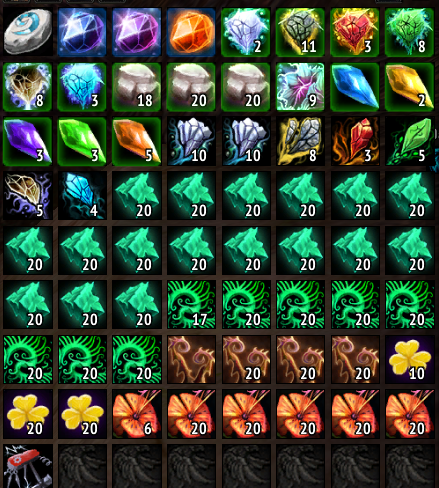
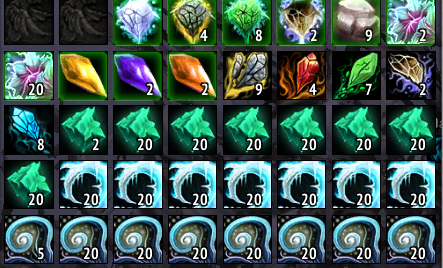
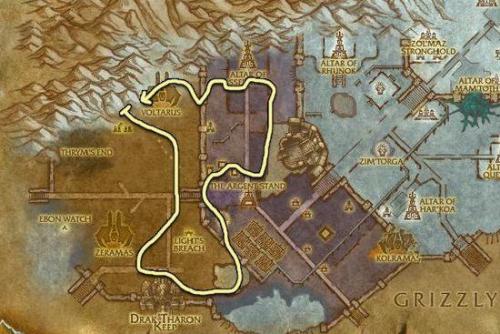
This is my Scholozar route I have used on multiple servers that has been profitable for me. The screenshot show's what I was able to gather in less than 2 hours until my bags were full.
- 207 Downloads
Submitted -
This pathing is across the lower section of the Storm Peaks, Avoiding the dense mob population of some of the northern areas that are likely to get you killed. It may not be the most Efficient, or most profitable, but it is survivable on my PServer.
Screenshot shows what I was able to collect in just 2 hours of running the bot with Mining and Herbalism in this area. Great for Litchbloom and Icethorn.
- 173 Downloads
Submitted -
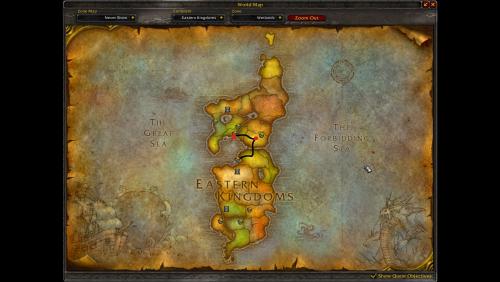
Recommended character level: +40 Recommended mining level: +125 Veins available: Tin, Iron, Gold and various other veins Settings: Use search range of 300. You can choose between enabling indoor nodes or not. Not having it enabled is safer but you lose on ores. Been a while since I uploaded. 6 years haha? But anyways, here's the pathing I used for getting through the 125-225 levels for both mining and blacksmithing. This profile should work for all pre-Cataclysm game versions. I recommend setting bot to stop on full inventory. This profile is not optimized for making profit, use strictly for leveling your professions. Screenshot for the route I used.
- 154 Downloads
Updated -
Irons , Gold, truesilvers, some Mithril .
You should disable bloodstones n your advanced settings
- 114 Downloads
Submitted -
Herbalism route from Gatherer and Routes Addon
Do not run REVERSE! or you will be stuck under hills . Or use Plug in SmoothMove.dll for recalculate route around the hills
Patch aligements set to 10
smoothnes to 2.6
Disable keyboard controls and Straffe
Character level 20+ (mount a´g group of mobs)
Mount setting ranges and maybe other ranges in the bot´s advaced setting you must have multiplied by Patch aligements sttings (here 10x) !
- 76 Downloads
Updated -
Crated from the Gatherer database and Route Addon .
Sugested lvl 40+ ideal for Paladins mount speed (very long way and group of mobs can)
- 73 Downloads
Submitted -
This route has been generated from the Route addon with Gatherer database.
Suggestet character level is = > 20 with mount bc pack of mobs sometime.
If you get stuck , modify your smooth settings , or little change change the path way .
Trigger it to make your character go around the map counter-clockwise
- 60 Downloads
Updated -
hi together,
I have collected all nodes for the server "rising-gods (german language)".
If you want you can also upload the gatherer.lua from your servers.
Please only if you didn't import from wowhead or gatherer_mate_data, because here the data from the official servers are transferred to the database, but they don't match with the private servers.
12.03.2021 How to install
English
Installing the database:
* Quit WoW completely
* Download the Gatherer.lua and
* Find the WoW folder, e.g. C:\Program Files (x86)\World of Warcraft\.
* Copy the Gatherer.lua into the subfolder WTF\Account\{$ACCOUNTNAME}\SavedVariables\ ({$ACCOUNTNAME} stands for your account name of course)
German
Installation der Datenbank:
* WoW komplett beenden
* Die Gatherer.lua downloaden und
* Den WoW-Ordner finden, z. B. C:\Program Files (x86)\World of Warcraft\
* Die entpackte Gatherer.lua in den Unterordner WTF\Account\{$ACCOUNTNAME}\SavedVariables\ kopieren ({$ACCOUNTNAME} steht natürlich für euren Accountnamen)
Die Daten können auch ohne den Bot genutzt werden - wer auf dem Server spielt hat so die meisten Nodes für das Addon "gatherer"
greetings
snow21
- 518 Downloads
- 1 Comments
Updated -
- 213 Downloads
Submitted -
- 708 Downloads
Submitted -
Thinking of people who, like me, do not earn in Euro or in dollars (I am Brazilian), the value of most waste pickers here is high because we pay in reais and the salary is very low.
I created this leveling mining for people who can't afford it. I will be improving constantly according to your feedback. I hope I have helped many people!
if you want to make a donation contact my email: [email protected]
HOW TO USE:
Extract the files to the: Wrobot > Profiles> Gatherer folder. Open the wrobot. In Main select Gatherer > Product Settings > Profile and select leveling. Select the General Settings > Fight Class AIO.dll In General Settings: Use Flying Mount [ON] Repair items [ON] Harvest Minerals [ON] Currently added:
[A] Elwynn Forest - Mine 1-65 [A] Westfall - Mine 65 -125 [A] Duskwood - Mine 125 -175 [A] Burning Steppes - Mine 175 - 275 [A] Hellfire Peninsula- Mine 275 - 350 [A] Shadowmoon Valley - Mine 325 - 350 [A] Borean Tundra -Mine 350 - 375 [A] Sholazar Basin - Mine 400 - 450
- 2537 Downloads
Submitted -
Hello everyone, this is a travel profile. ?
It will take you from Menethil Harbor to Southshore on foot or mount.
It will automatically talk with FLIGHT MASTERS so you will get flight points in REFUGE POINTE and SOUTHSHORE.
You should put the FILE in the GATHERER profile folder.
The travel is on the main road so it's minimum danger.
Don't forget to turn on the loot herb/nodes option because there are some near the road. ☘️
Thank you.- 43 Downloads
Submitted -
Hey Friends,
welcome to my new wRobot Project! In this series I want to offer you the next Generation of FREE Profiles for WOTLK!
The first release is my Work in Progress Herb/Mine Project. 1-450 Herbalism and Mining! I will add more and more Profiles
while I level my Herbalism on different WOTLK Servers. The Routes are always big ones (whole Zone Routes).
Where do I start the Profiles?
You can start the Profiles ANYWHERE in the desired Zone, it will always find the perfect way
via Pathfinding. There should not be any problem with starting them even in a Zone which is
near to your desired one.
What do I aim for?
- Bugfree & without Stucks!
- Herb / Mine Profiles for Level 1-450 Prof.
- Most efficient Routes!
Currently added:
- 1-75 | Elwynn Forest
- 75-150 | Westfal
If you want to support our work, give us a 5-Star Rating!
~ Marvelino123- 2383 Downloads
Updated -
- 861 Downloads
Submitted -
Hello!
This is a profile dedicated to the gathering of Talandra's Rose in Zul'Drak.
The bot will make the precise path where these herbs usually spawn most!
Enjoy!- 660 Downloads
Submitted -
Hi,
I've been creating a gathering profile for thorium ore in Winterspring and it works surprisingly well.
You should have good gear/melee since it also farms in the south where some elites are. I've been using a lvl 54 paladin.
Make sure to set "Ignore mobs when on ground mount" or the bot will mostly fight mobs ?.
Repair is added in Everlook but haven't tested it yet.
Ores: true silver ores, mithril ores, small thorium ores and rich thorium ores
- 716 Downloads
Submitted -
Zangarmarsh
Flammenkappe - Flamecap
Kann man auch sehr gut zum hochskillen des Berufs Kräuterkunde nutzen
Tragt bitte hier nur unter "Settings" ein was ihr farmen wollt und was nicht sonst farmt er alles
have fun- 349 Downloads
Updated -
Howling Fjord - Herb - Goldclover/Goldklee
i use this profile only for herb/kräuterkunde
have fun- 839 Downloads
Updated -
- 1044 Downloads
Updated -
- 993 Downloads
Submitted -
Simple gatherer for herbing and mining in Tirisfal Glades.
- 356 Downloads
Submitted -
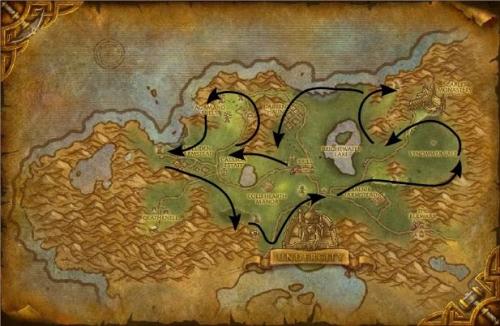
Recommended character level: +20 Recommended herbalism level: +50 Herbs available: Peacebloom, Silverleaf, Earthroot, Mageroyal and Briarthorn. Settings: Use search range of 300 Simple herbalism route for Horde toons. Made for WOTLK, but might work for anything pre-Cataclysm aswell.
No sharp turns, I recommend having atleast +60% mount for this one. Make sure you have decent class rotation if you're low level, you might have to fight multiple harpies at the top left part of Barrens.- 301 Downloads
Submitted -
Recommended character level: +70 Recommended mining level: +205 Veins available: Gold, Mithril, Truesilver, Thorium, Dark Iron Settings: Use search range of 300, enable indoors mining Simple mining routine for Burning Steppes, only for TBC and WOTLK usage, tested with WOTLK.
- 597 Downloads
Updated -
Recommended character level: +50 Recommended mining level: +205 Veins available: Iron, Gold, Mithril, Truesilver, Thorium, Dark Iron Settings: Use search range of 300, do not mine indoor nodes Just a simple pre-cataclysm mining path. Tested in WOTLK, but might work in TBC and vanilla aswell.
- 512 Downloads
Updated