




🧠 SmartGatherer v1.4.0 – the smart choice for herbing and mining (WotLK 3.3.5a)
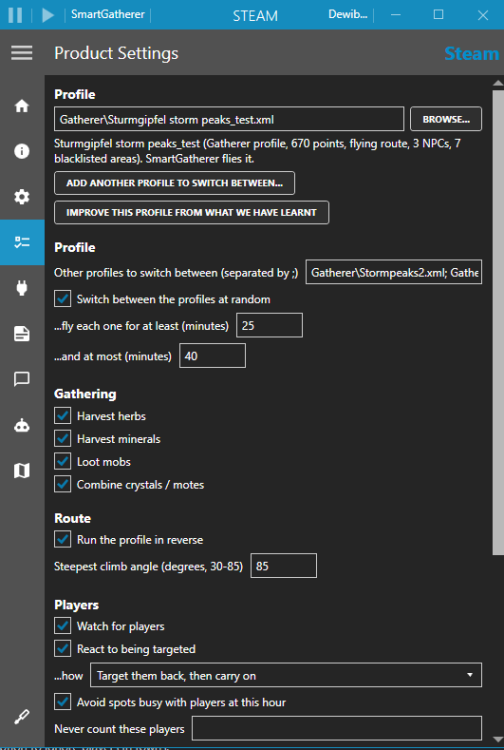
SmartGatherer is a gathering product for WRobot. It replaces the stock Gatherer, so you don’t need a separate plugin. You load a normal Gatherer profile and SmartGatherer flies the route, picks the nodes, and watches out for the things that get bots noticed: other players, mobs, GMs and getting stuck.
It works for herbalism and mining. It’s built and tested on WotLK 3.3.5a, mostly farming Storm Peaks.
✈️ It flies like a player
SmartGatherer flies the whole route itself and steers with the mouse, so curves are smooth instead of the usual turn-key wobble. If the game won’t accept mouse steering, it falls back to the keys.
It goes down to nodes nose-first, either in an angled dive or straight down onto the node, and doesn’t sink level holding X.
It goes round mobs rather than over them, and only climbs over when the way round isn’t clear.
Timed route: if nothing on the next stretch will have respawned yet, it cuts across that part of the route.
If a profile isn’t a closed loop, it flies the route out and back.
It doesn’t try to land under roofs or overhangs, or on slopes too steep to stand on.
👀 Players
It only leaves when a player comes close, heads your way, follows you or targets you. Players who are just passing are left alone, and their path is kept clear.
When it does leave, it flies off on the escape route that keeps furthest from everyone, waits until they’ve gone, then carries on from the far side of the route.
You choose how it reacts to being targeted: leave, target them back, target back and wave, carry on, or “Mixed”, which picks something different each time.
If the same player keeps turning up, it can fly the route the other way round, so you pass them once instead of trailing them.
Players who look AFK are ignored until they move.
An ignore list for your alts and friends, and an option to ignore players in towns.
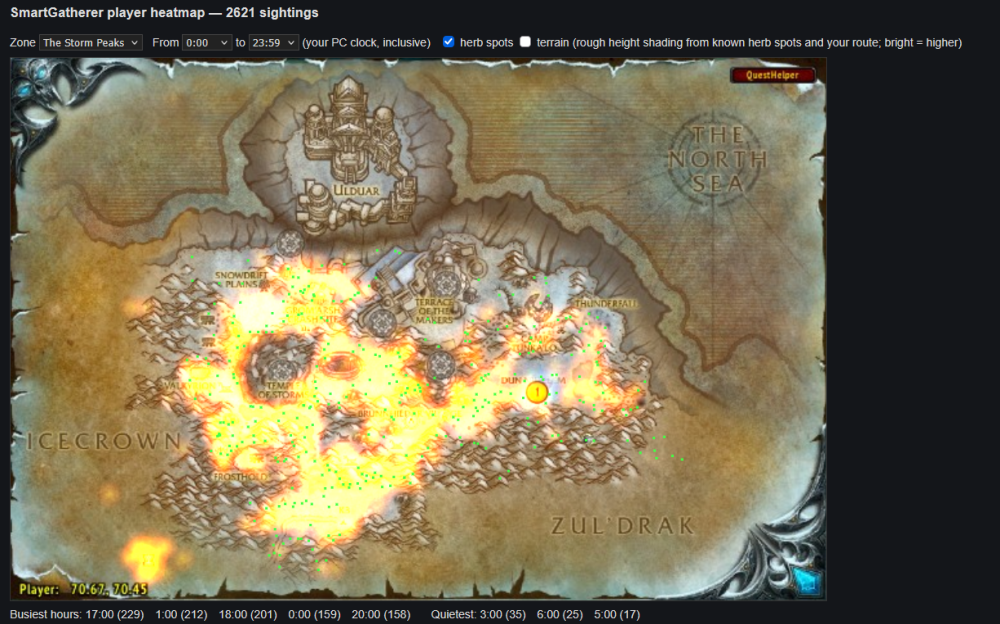
Player heatmap: it records where and when players are seen, and can skip spots that are usually busy at the current hour. It also builds an HTML map of the zone with the busiest and quietest hours.
🐉 Mobs
Each mob gets its own danger radius based on its level, whether it’s elite, and its aggro range. There’s a list of extra-dangerous mobs, such as patrolling wyrms, that get more room.
It remembers where mobs stand and patrol between sessions. Nodes next to a regular spawn are skipped before the mob is even in sight.
It leaves at the first sign of a pull, turning away before the mob reaches you.
Optional: it fights mobs at a node when it’s sure it can win (not elite, within the level limit you set, and nothing nearby to join in). It uses your fight class and then picks the node.
It can ask the game whether a mob is really hostile, which accounts for reputation (Sons of Hodir, Frenzyheart and Oracles) and disguises such as Lok’lira’s Bargain.
Nodes that always have a mob next to them are eventually dropped for good.
No-go areas: nodes in places like the Sparksocket Minefield are never gone for.
🛡️ Safety
It watches for signs a GM is involved: whispers, being teleported or summoned, losing control of your character with no mob around, and odd buffs appearing out of combat.
Safety actions you can set per event: stop the bot, pause it, log out, close the game, or just alert you (red text in game, a log line and a sound). Events include deaths, whispers, rare mobs, a player nearby, a sudden health drop, no gathering for a while, and getting stuck.
Rare mob alerts, for example Time-Lost Proto Drake, Vyragosa and Loque’nahak.
Faction-safe town trips: it never uses the other faction’s mailboxes or vendors, and avoids towns where you were attacked or killed.
Unstuck: it heads back to the last safe spot and remembers where you got stuck so it goes round next time.
Mount guard: WRobot won’t recast your mount and dismount you.
🗺️ Extras
Minimap dots: known nodes are coloured by how risky they are.
A bag stack combiner is built in. It leaves combining to the StackCombiner plugin if that’s switched on.
Session report: nodes per hour, safety trips, and spots that keep coming up empty.
📦 Install
Put
SmartGatherer.dllinWRobot\Products\.Pick SmartGatherer in WRobot’s product list.
Load any Gatherer profile. Flying routes get the full pilot. On ground routes, WRobot keeps control of movement.
Set things up on the settings page. Everything SmartGatherer learns is saved in
WRobot\Settings\SmartGatherer-*.txt.
Requirements: WRobot for 3.3.5a, a fight class, and Herbalism or Mining.
🐞 Bugs and suggestions
Post below with your WRobot log (WRobot\Logs). If something odd happened, turn on Debug in the settings first.
☕ Support
SmartGatherer is free. If it saves you some gold-farming hours, you can buy me a coffee: https://buymeacoffee.com/ghostgather
You may only provide a review once you have downloaded the file.
There are no reviews to display.