Skip to content
View in the app

A better way to browse. Learn more.

WRobot

A full-screen app on your home screen with push notifications, badges and more.

To install this app on iOS and iPadOS
  1. Tap the Share icon in Safari
  2. Scroll the menu and tap Add to Home Screen.
  3. Tap Add in the top-right corner.
To install this app on Android
  1. Tap the 3-dot menu (⋮) in the top-right corner of the browser.
  2. Tap Add to Home screen or Install app.
  3. Confirm by tapping Install.

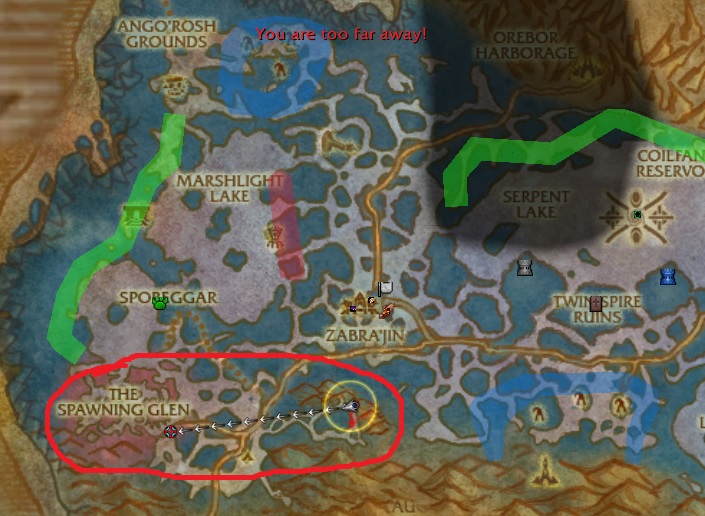
Sporgarr rep

(2 reviews)

1 Screenshot

User Feedback

Recommended Comments

Seumas

Elite user

Beautiful profile good work man just hit exalted.

nonstop1005

Elite user

tyty

Reaper666

Members

I tested this profile out on my feral druid cuz i figured easy rep and xp. Unfortunately the bot seemed to have a center point  that it would stay around at all times until something close spawns. It wont reach out more. Im not sure if its something on my end but the profile was no use for me. But I have tried ur other profiles and they work great.


Account

Navigation

Search

Search

Configure browser push notifications

Chrome (Android)
  1. Tap the lock icon next to the address bar.
  2. Tap Permissions → Notifications.
  3. Adjust your preference.
Chrome (Desktop)
  1. Click the padlock icon in the address bar.
  2. Select Site settings.
  3. Find Notifications and adjust your preference.