




Skip to content
View in the app

A better way to browse. Learn more.

WRobot

A full-screen app on your home screen with push notifications, badges and more.
To install this app on iOS and iPadOS
  1. Tap the Share icon in Safari
  2. Scroll the menu and tap Add to Home Screen.
  3. Tap Add in the top-right corner.
To install this app on Android
  1. Tap the 3-dot menu (⋮) in the top-right corner of the browser.
  2. Tap Add to Home screen or Install app.
  3. Confirm by tapping Install.

90-93 Shadowmoon Valley (Alliance) 1

(1 review)

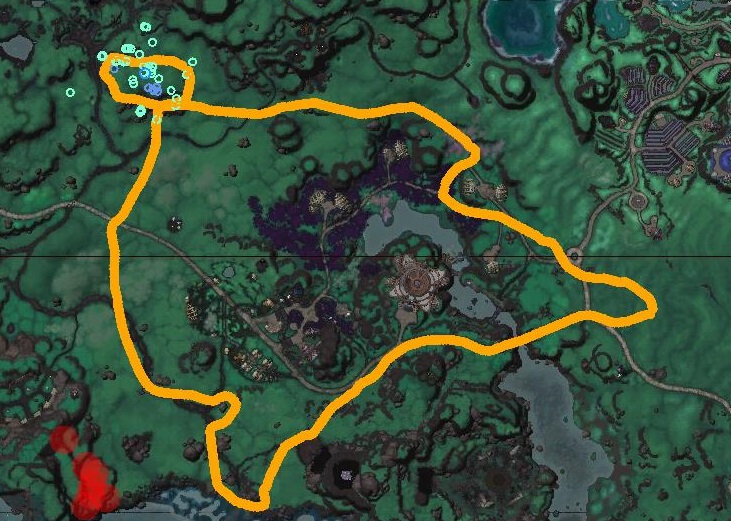
1 Screenshot

90-93 Shadowmoon Valley (Alliance) (~100 000 XP/HR)

ps: I recommand to use potion

http://www.wowhead.com/item=120182

What's New in Version 1

Released

  • Add blacklisted zones

User Feedback

Recommended Comments

DanalD

Members

need it to do the starting quest not killing mobs because when you get to fair away from the archmage he ports you back to him

connorrey

Members

how long does it take?

Hello,


@DanalD: I work on a quests profile for the WoD starting zone.


@connorrey: The profile make approximately 100 000 xp/hr, it takes 7 hours per level.

DanalD

Members

i loadedthis and tryed it and my guy just took off running did not try to get quest 

xXWarzoneXx

Members

Nice ^^

reefer75

Members

going to try it out now can't wait lol


so far so good loving it  :wub:  :wub:  :wub:

jubi

Members

I get stuck in a tree :( any one else have that issue

stephencadams

Members

Droidz,

 Do you have a horde version of this?

jonnyboy899

Members

This doesnt work for me

ddany

Members

just runnning around in shadowmoon, barely attacks any mob. 70k xp /hr with rested + potion!

Hiddensock

Members

nice

jonnyboy899

Members

How can you turn the flight distance up? i think it looks really inhuman to have the air mount basically walking?

Relev

Members

Using this in 7.1 with a shadow priest.

30 min in and I'm getting about 350k xp/hr with rested, full heirlooms, and potion of accelerated learning. Only issue I'm running into is that it's trying to attack dead things occasionally for some reason.

katai

Members

@Relev having the same problem, did u get any fix for it? 

Account

Navigation

Search

Search

Configure browser push notifications

Chrome (Android)
  1. Tap the lock icon next to the address bar.
  2. Tap Permissions → Notifications.
  3. Adjust your preference.
Chrome (Desktop)
  1. Click the padlock icon in the address bar.
  2. Select Site settings.
  3. Find Notifications and adjust your preference.