




Skip to content
View in the app

A better way to browse. Learn more.

WRobot

A full-screen app on your home screen with push notifications, badges and more.
To install this app on iOS and iPadOS
  1. Tap the Share icon in Safari
  2. Scroll the menu and tap Add to Home Screen.
  3. Tap Add in the top-right corner.
To install this app on Android
  1. Tap the 3-dot menu (⋮) in the top-right corner of the browser.
  2. Tap Add to Home screen or Install app.
  3. Confirm by tapping Install.

Loot Statistics 1

(0 reviews)

1 Screenshot

Loot Statistics


This plugin add in your log looted items.


How to use:


- Move downloaded file to folder "WRobot\Plugins\".


- Launch WRobot and go to tab "Plugins".


- Activate "Loot Statistics.cs".

User Feedback

Recommended Comments

Lokiro

Members

and where is show the stats ?

CrazyDream97

Members

 I have the same problem ...

Daxtedge

Members

+1


linim

Members

On 10/12/2017 at 1:57 AM, Lokiro said:

and where is show the stats ?


On 12/18/2017 at 8:38 PM, CrazyDream97 said:

 I have the same problem ...

On 3/20/2018 at 12:20 AM, Daxtedge said:

+1


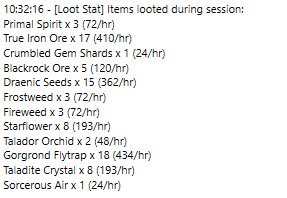
These guys have not been active for a while, but if someone else is wondering where you find the statistics. Open the logfile. it is stated there at the end of the session. See attached image.

log.PNG

Account

Navigation

Search

Search

Configure browser push notifications

Chrome (Android)
  1. Tap the lock icon next to the address bar.
  2. Tap Permissions → Notifications.
  3. Adjust your preference.
Chrome (Desktop)
  1. Click the padlock icon in the address bar.
  2. Select Site settings.
  3. Find Notifications and adjust your preference.
