



Skip to content
View in the app

A better way to browse. Learn more.

WRobot

A full-screen app on your home screen with push notifications, badges and more.

To install this app on iOS and iPadOS
  1. Tap the Share icon in Safari
  2. Scroll the menu and tap Add to Home Screen.
  3. Tap Add in the top-right corner.
To install this app on Android
  1. Tap the 3-dot menu (⋮) in the top-right corner of the browser.
  2. Tap Add to Home screen or Install app.
  3. Confirm by tapping Install.

Brewmaster Monk V 1.0 1.0.0

(0 reviews)

1 Screenshot

Hi All,

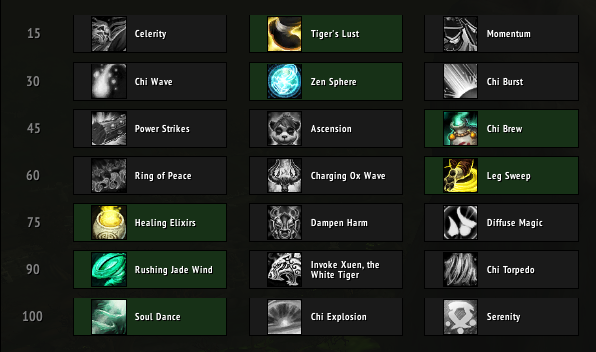
please see talent tree attached.

this is my first fight class, fully created in the fight class editor (no skill as of yet with C sharp programming) my buddy Botnut (props mate) helped me out with the tweaking and testing.

we've both been running it tonight and have no problems staying alive with 5-6 to elite mobs in throne of kil'jaeden using just Wrotation.

give it a shot see how you guys like it, please leave comments and feedback its appreciated.

Cheers all

Kete

User Feedback

Recommended Comments

Samy

Members

thank you, I will try

Create an account or sign in to comment

Account

Navigation

Search

Search

Configure browser push notifications

Chrome (Android)
  1. Tap the lock icon next to the address bar.
  2. Tap Permissions → Notifications.
  3. Adjust your preference.
Chrome (Desktop)
  1. Click the padlock icon in the address bar.
  2. Select Site settings.
  3. Find Notifications and adjust your preference.