




Skip to content
View in the app

A better way to browse. Learn more.

WRobot

A full-screen app on your home screen with push notifications, badges and more.

To install this app on iOS and iPadOS
  1. Tap the Share icon in Safari
  2. Scroll the menu and tap Add to Home Screen.
  3. Tap Add in the top-right corner.
To install this app on Android
  1. Tap the 3-dot menu (⋮) in the top-right corner of the browser.
  2. Tap Add to Home screen or Install app.
  3. Confirm by tapping Install.

DH Havoc PVP by Jhin 1.0

(0 reviews)

2 Screenshots

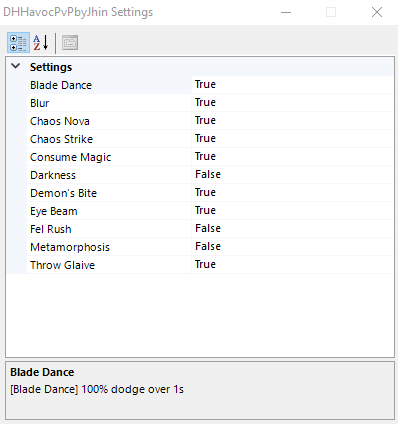
Here's my first fightclass, its pretty simple but works like a charm. i'll try to update it when they release Legion. Have fun. Everything is customable, just check the settings I added a description to everything. to change Consume Magic, you'll need to edit the XML file and change 61 to any hp% you want +1. hope it helps. THanks Droidz for this amazing tool :)


This fightclass is mainly for manual control, but you can use it in botting, I added Fel Rush in settings :)

I suggest to use the build above.


PLEASE REPORT ANY ERROR YOU FIND' I'LL TRY TO PATCH THEM :) BTW ROTATION DON'T WORK ON DUMMY BECAUSE I ADDED "PLAYER ONLY" TO ALL HIGH-CD SPELLS SO YOU DONT WASTE THEM ON PETS ACCIDENTLY. (only Demon's bite and Chaos Strike will works.)

User Feedback

You may only provide a review once you have downloaded the file.

There are no reviews to display.

Account

Navigation

Search

Search

Configure browser push notifications

Chrome (Android)
  1. Tap the lock icon next to the address bar.
  2. Tap Permissions → Notifications.
  3. Adjust your preference.
Chrome (Desktop)
  1. Click the padlock icon in the address bar.
  2. Select Site settings.
  3. Find Notifications and adjust your preference.