



Skip to content
View in the app

A better way to browse. Learn more.

WRobot

A full-screen app on your home screen with push notifications, badges and more.

To install this app on iOS and iPadOS
  1. Tap the Share icon in Safari
  2. Scroll the menu and tap Add to Home Screen.
  3. Tap Add in the top-right corner.
To install this app on Android
  1. Tap the 3-dot menu (⋮) in the top-right corner of the browser.
  2. Tap Add to Home screen or Install app.
  3. Confirm by tapping Install.

Resto Druid MultiLanguage 1.0.5

(1 review)

Hello,

This is a try out to see if it works on non English games.

Let me know if it works, then I can work further on it.

I tested it in LFR and it worked for my English client.


What's New in Version 1.0.5

Released

Druid Healing Routine, without last talents. Used talents included.

Test it out and give feedback.

Use the 100 passive talent and it will work well.

Let me know if it support multi-language.

1.0.5 : enable or disable Efflorescence. Manual casting it is better, because it realy gives problems.
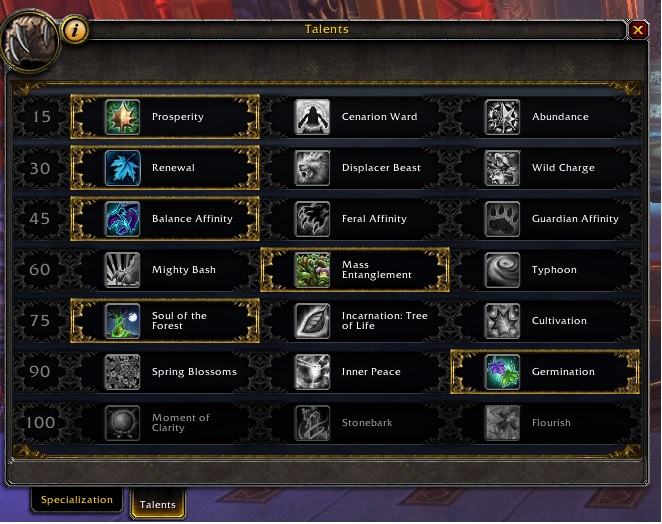
RestoTalents.jpg

MyResto.dll

User Feedback

You may only provide a review once you have downloaded the file.

   1 of 2 members found this review helpful 1 / 2 members

so good! very responsive!

Account

Navigation

Search

Search

Configure browser push notifications

Chrome (Android)
  1. Tap the lock icon next to the address bar.
  2. Tap Permissions → Notifications.
  3. Adjust your preference.
Chrome (Desktop)
  1. Click the padlock icon in the address bar.
  2. Select Site settings.
  3. Find Notifications and adjust your preference.
