



Skip to content
View in the app

A better way to browse. Learn more.

WRobot

A full-screen app on your home screen with push notifications, badges and more.

To install this app on iOS and iPadOS
  1. Tap the Share icon in Safari
  2. Scroll the menu and tap Add to Home Screen.
  3. Tap Add in the top-right corner.
To install this app on Android
  1. Tap the 3-dot menu (⋮) in the top-right corner of the browser.
  2. Tap Add to Home screen or Install app.
  3. Confirm by tapping Install.

Brewmaster Monk by Fistweaver 1.0.0

(0 reviews)

1 Screenshot

Hey guys!

Couldn't find any Brewmaster fightclasses here, so decided to make one of my own, nothing special, pretty simple, but works flawless for me. 

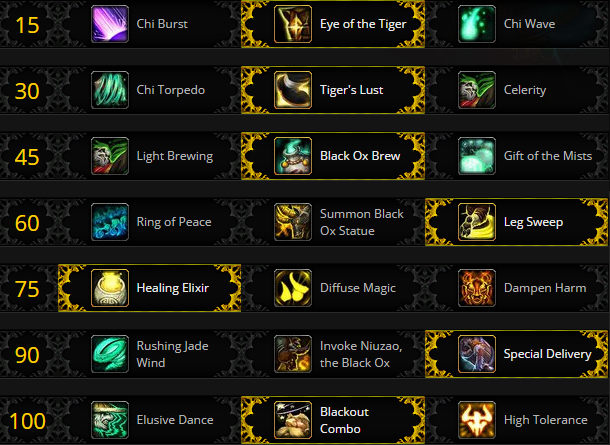
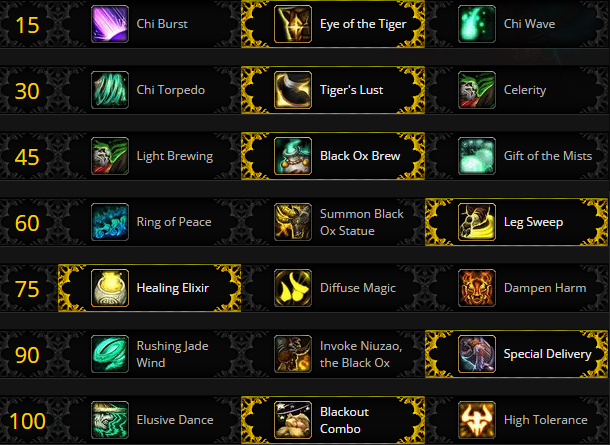
Works best with the talent tree below.

Using Keg Smash, Blackout Strike as default spells and Breath of Fire when Blackout Combo (Talent) buff is on the target. Also uses Exploding Keg if there's 3 mobs or more. Also uses Effuse (Heal) when on 35% or less HP. (Not tested yet, since i'm never dropping below 35% kinda, will do a test soon)

Using Spear Hand Strike to Interrupt mobs, and Leg Sweep aswell when Spear Hand Strike is on cooldown. 


Feedback negative as positive is more than welcome :) 
brewmasterspec.png

What's New in Version 1.0.0

Released

No changelog available for this version.

User Feedback

Recommended Comments

Ketefil

Members

have you tried it out in instances?

Fistweaver

Members

On 10/17/2016 at 11:11 PM, Ketefil said:

have you tried it out in instances?

No sorry Ketefil, ain't running no instance botting due to the risks. Wouldn't recommend botting as tank anyways since you put follow on another party member and sometimes do skips.

Ketefil

Members

apologies i meant more so as wrotation, not running as full bot

pectopah

Members

he not heal himself or use protection habilities .... :(

pectopah

Members

sorry heal after 30% but too late 30% can i change it to 70% ?

Account

Navigation

Search

Search

Configure browser push notifications

Chrome (Android)
  1. Tap the lock icon next to the address bar.
  2. Tap Permissions → Notifications.
  3. Adjust your preference.
Chrome (Desktop)
  1. Click the padlock icon in the address bar.
  2. Select Site settings.
  3. Find Notifications and adjust your preference.