Droidz
Administrators
-
Joined
-
Last visited
Everything posted by Droidz
-
Hello, I'll look it but this doesn't cause problem normally.
-
Hello, Can you share your fightclass please. Thanks
-
Hello, I have replied in support request:
-
Hello, Launch Ginder Profile creator, load your profile, select id of target at remove and press key "Del", save your profile and is done. If you want I can remove mobs if you give me wowhead link. Thanks.
-
Hello, It is possible (if you create fightclass in C#) but for the moment no fightclass supporting this. Sorry.
-
Hello, This problem is caused by bliz, wait their wow hotfix (I think today).
-
Hello, 24245 is an item (not world object), try id 182053 (http://www.wowhead.com/object=182053)
-
WRobot is now compatible with the new version of wow (5.4.1.17538). If you play in european wow server wait tomorow to update WRobot (if you have update WRobot you need to downgrade version, download WRobot for Wow 5.4.0 here). ps: Reports problems here: ps: Wow changelog: http://www.wowwiki.com/Patch_5.4.1
-
Hello, Reports here all hot bugs appear with WRobot 1.5.0 (for others bugs/suggestion please use bug tracker). (Don't forget to share ) ps: To get more info about this update: http://wrobot.eu/page/articles.html/_/news/wrobot-150-just-released-auction-bot-and-more-r82.
-
WRobot is now compatible with the new version of wow (5.4.1.17538). If you play in european wow server wait tomorow to update WRobot (if you have update WRobot you need to downgrade version, download WRobot for Wow 5.4.0 here). ps: Reports problems here: ps: Wow changelog: http://www.wowwiki.com/Patch_5.4.1
-
Do you have download WRobot (not crobot)?
-
Hello, Sorry I don't understand what is exactly the problem, can you expand with more detail. Thanks.
-
Hello, Please contact me by private message.
-
Hello, You can try the attached profile (no tested). You can also create your own profile, very easy and quickly (look this). (moved to good forum) 1-60 Horde New World Kalimdor.xml
-
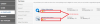
Bonjour, Cela signifie que vous pouvez trouver votre clé de licence WRobot ici: http://wrobot.eu/index.php?app=nexus&module=clients§ion=purchases Il vous suffit après de copier votre clé (encadré en rouge sur l'image jointe a ce poste*) et de la coller quand WRobot vous demande votre clé (juste après avec sélectionné le processus Wow). *
-
Using macro tools is the easy way (recommanded). But if you want add to fightclass you macro you need to use RunMacroText. - For you, in your fightclass add new spell name: RunMacroText("/use Sludge-Covered Object") - In spell settings activate "Not spell, is lua script". - (after you can add "Timer" settings (5000 for launch this macro all 5 secondes) and disable settings "In combat only").
-
Hello, Yes you can pick up Netherwing Egg. Go to "General Settings" > "Enter advanced settings..." > tab "Looting and Farming options" > in "Harverst object (one id by line):" add egg id: 185915 Save settings and launch bot, now wrobot pickup Netherwing Egg nearest of the character.
-
I'll look it.
-
Hello, This haven't importance, wow don't read process name to detect if bot is used or no, but, I have fixed it, wait the next update for get same file name/Process name. For the moment you can use Resource Hacker to change application informations (you can also rename .exe file and change windows name in tab "Tools".
-
Thanks for your suggestions, I'll look it, I come back to you after.
-
I'll look it, I come back to you after thanks
-
Hello, Sorry I don't understand exactly what you want say. WRobot launching the blacklisted spells? Or ignore the no blacklisted spells?
-
I have added code in wrobot to force at not launch spell when in pet battle combat, but this is probably caused by your fightclass. Wait the next update.
-
Hello, Can you give me your fightclass (or the name) and your logs of bugged session please. Thanks
-
Hello, For leveling prefer quester (for the moment not all races/levels is supported by quester, you need to use "Grinder" bot if you don't found quests profiles for your character level).