



Skip to content
View in the app

A better way to browse. Learn more.

WRobot

A full-screen app on your home screen with push notifications, badges and more.

To install this app on iOS and iPadOS
  1. Tap the Share icon in Safari
  2. Scroll the menu and tap Add to Home Screen.
  3. Tap Add in the top-right corner.
To install this app on Android
  1. Tap the 3-dot menu (⋮) in the top-right corner of the browser.
  2. Tap Add to Home screen or Install app.
  3. Confirm by tapping Install.

Mrbig

Members
  • Joined

  • Last visited

Everything posted by Mrbig

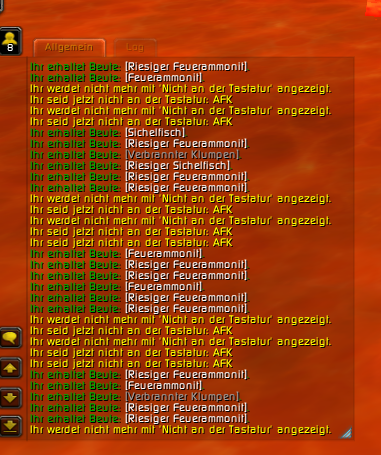
  1. I recently bought your farm-bot for World of Warcraft. While running it, I experienced the problem that my account goes "afk" after about 5 minutes and another 30 minutes later the account automatically logs off, which forces me to stay at my PC to prevent that from happening. This Problem only occurs when i send the bot fishing, the rest works fine. I hope you could help me fix this problem. I will attach the farm-bots Log to this Message. 28 Feb 2015 21H19.log.html
Account

Navigation

Search

Search

Configure browser push notifications

Chrome (Android)
  1. Tap the lock icon next to the address bar.
  2. Tap Permissions → Notifications.
  3. Adjust your preference.
Chrome (Desktop)
  1. Click the padlock icon in the address bar.
  2. Select Site settings.
  3. Find Notifications and adjust your preference.