




jjavier1
Members
-
Joined
-
Last visited
Everything posted by jjavier1
-
I moved the Wow-64.exe into a different folder and NOW it's working! Thanks so much Droidz and keep up the great work as a programmer!
-
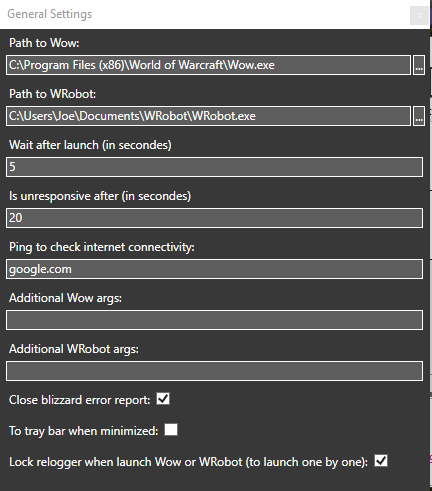
See image attached with my General Settings.
-
Wrobot works perfectly fine without Relogger. I get these two logs Wrobot creates when Relogger is always launching and closing with Relogger. 3 Oct 2016 17H07.log.html 3 Oct 2016 17H51 - Wguz.log.html
-
I tried incrementing but that only increased the amount of time between closing and relaunching over and over again. Log: [D] 13:19:23 - [Info] Log file created: 2 Oct 2016 13H19.log.html13:19:23 - Relogger 1.1.0 (4675) started.[D] 13:19:23 - [Info] Offical website: http://wrobot.eu/[D] 13:19:23 - [Info] Operating System Details: Microsoft Windows NT 6.2.9200.0[D] 13:19:23 - [Info] Lang: English (United States)13:19:33 - Start profile Test.13:19:33 - Profile Test, Run task[1]: Run (Skin Highmountain)[D] 13:19:33 - Profile Test, running task for 3 minutes.[D] 13:19:33 - Profile Test: Launch Wow.[D] 13:19:43 - Profile Test: Launch WRobot.[D] 13:19:55 - Profile Test: Launch Wow.[D] 13:20:05 - Profile Test: Launch WRobot.[D] 13:20:18 - Stopping profile Test, please wait.13:20:20 - Profile Test stopped.13:24:05 - Start profile Test.13:24:05 - Profile Test, Run task[1]: Run (Skin Highmountain)[D] 13:24:05 - Profile Test, running task for 3 minutes.[D] 13:24:05 - Profile Test: Launch Wow.[D] 13:24:15 - Profile Test: Launch WRobot.[D] 13:24:22 - Stopping profile Test, please wait.13:24:24 - Profile Test stopped.13:24:29 - Start profile Test.13:24:29 - Profile Test, Run task[1]: Run (Skin Highmountain)[D] 13:24:29 - Profile Test, running task for 3 minutes.[D] 13:24:30 - Profile Test: Launch Wow.[D] 13:24:40 - Profile Test: Launch WRobot.[D] 13:24:52 - Profile Test: Launch Wow.[D] 13:24:57 - Stopping profile Test, please wait.13:24:59 - Profile Test stopped.13:25:28 - Start profile Test.13:25:28 - Profile Test, Run task[1]: Run (Skin Highmountain)[D] 13:25:28 - Profile Test, running task for 3 minutes.[D] 13:25:28 - Profile Test: Launch Wow.[D] 13:25:49 - Profile Test: Launch WRobot.[D] 13:26:11 - Profile Test: Launch Wow.[D] 13:26:31 - Profile Test: Launch WRobot.[D] 13:26:54 - Profile Test: Launch Wow.[D] 13:27:14 - Profile Test: Launch WRobot.[D] 13:27:37 - Profile Test: Launch Wow.[D] 13:27:57 - Profile Test: Launch WRobot.[D] 13:28:24 - Ping google.com returning false.[D] 13:28:26 - Profile Test: Launch Wow.[D] 13:28:46 - Profile Test: Launch WRobot.13:29:09 - Profile Test, Run task[2]: Wait[D] 13:29:09 - Profile Test waiting for 2 minutes.
-
Hi, I'm having a problem running a Relogger profile. I followed all the steps that Eeny explained in his Relogger tutorial video, but when I start running the profile, Wrobot and Wow 32-bit keep launching and closing over and over again. Attached is the short Relogger log with the profile running in a short amount of time. Did I forget to install something or what am I doing wrong? 1 Oct 2016 20H24.log.html
