



Skip to content
View in the app

A better way to browse. Learn more.

WRobot

A full-screen app on your home screen with push notifications, badges and more.

To install this app on iOS and iPadOS
  1. Tap the Share icon in Safari
  2. Scroll the menu and tap Add to Home Screen.
  3. Tap Add in the top-right corner.
To install this app on Android
  1. Tap the 3-dot menu (⋮) in the top-right corner of the browser.
  2. Tap Add to Home screen or Install app.
  3. Confirm by tapping Install.

gamerquestdude

Members
  • Joined

  • Last visited

  1. Hey guys I can't find the leeching poisons spell for assassin rogues and I would like him to apply that instead of crippling, any help will be great.
  2. I black listed the water fall and I am still getting stuck, any ideas?? other than that thanks a ton for making this !!!!
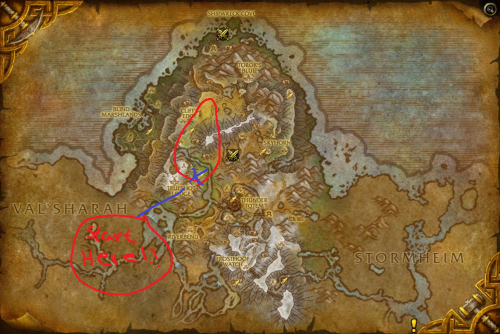
  3. so were is the start zone??
  4. Hey, I own the full version of the bot, is it possible to bot two different accounts with the bot on the same pc?
  5. I have zero idea how to use new profiles I download
  6. Hey I was super interested in buying but I had a few questions, is there a skype I can add or anything?
Account

Navigation

Search

Search

Configure browser push notifications

Chrome (Android)
  1. Tap the lock icon next to the address bar.
  2. Tap Permissions → Notifications.
  3. Adjust your preference.
Chrome (Desktop)
  1. Click the padlock icon in the address bar.
  2. Select Site settings.
  3. Find Notifications and adjust your preference.