




Skip to content
View in the app

A better way to browse. Learn more.

WRobot

A full-screen app on your home screen with push notifications, badges and more.

To install this app on iOS and iPadOS
  1. Tap the Share icon in Safari
  2. Scroll the menu and tap Add to Home Screen.
  3. Tap Add in the top-right corner.
To install this app on Android
  1. Tap the 3-dot menu (⋮) in the top-right corner of the browser.
  2. Tap Add to Home screen or Install app.
  3. Confirm by tapping Install.

AFKitten

Members
  • Joined

  • Last visited

Everything posted by AFKitten

  1. Relogger Settings: Account Email: [email protected] Account Password: Password BattleNet Account: WoW2
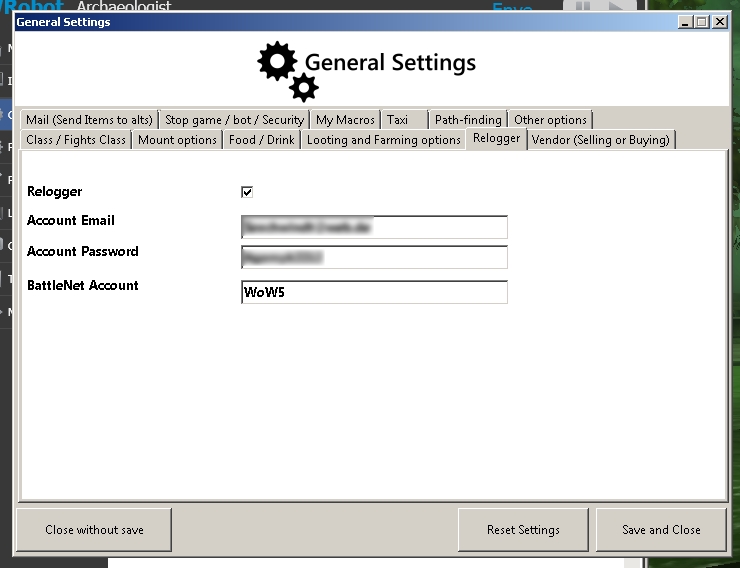
  2. I run multiple WoW accounts on the same Battle.net account without problems. Did you enter the respective account name ("WoW2") in the "BattleNet Account" field?
  3. The Archaeologist still does not fly. 15:39:16 - [Archaeology] Go to Digsite Ruins of Ordil'Aran (distance: 6137,862) [D] 15:39:16 - [MovementManager] You try to use flying/swimming path but you cannot fly/swim here, try to use ground mouvement...

Account

Navigation

Search

Search

Configure browser push notifications

Chrome (Android)
  1. Tap the lock icon next to the address bar.
  2. Tap Permissions → Notifications.
  3. Adjust your preference.
Chrome (Desktop)
  1. Click the padlock icon in the address bar.
  2. Select Site settings.
  3. Find Notifications and adjust your preference.