



Skip to content
View in the app

A better way to browse. Learn more.

WRobot

A full-screen app on your home screen with push notifications, badges and more.

To install this app on iOS and iPadOS
  1. Tap the Share icon in Safari
  2. Scroll the menu and tap Add to Home Screen.
  3. Tap Add in the top-right corner.
To install this app on Android
  1. Tap the 3-dot menu (⋮) in the top-right corner of the browser.
  2. Tap Add to Home screen or Install app.
  3. Confirm by tapping Install.

djheffa123

Members
  • Joined

  • Last visited

Everything posted by djheffa123

  1. how to turn of so my bot dosent try to usse flight pad
  2. my english was baad but i say it worked all day in morning today to but not i got dc started it now and didnt work
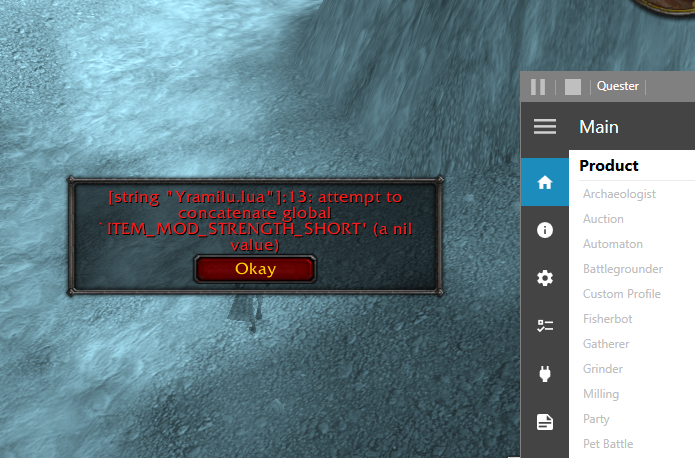
  3. i havent any profil before but now my quesssting profil get error and dont load and what is that error
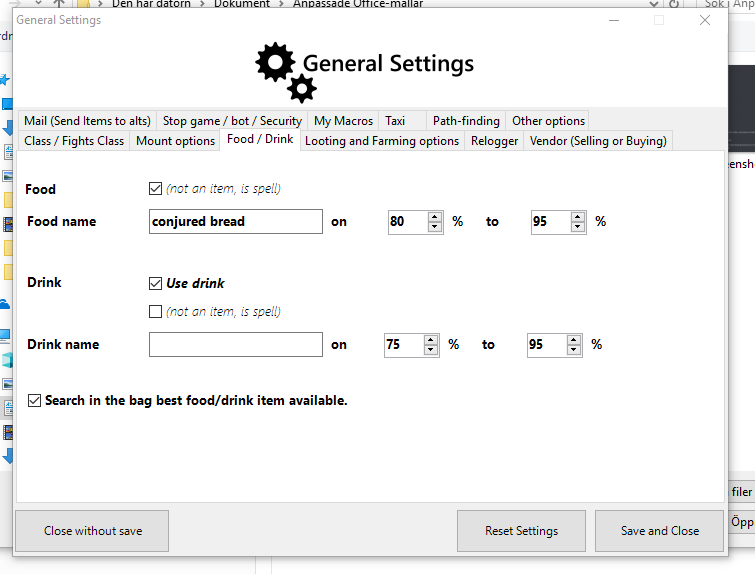
  4. dont use food only mana and i have the corect name in bot on the food i havew in bag
Account

Navigation

Search

Search

Configure browser push notifications

Chrome (Android)
  1. Tap the lock icon next to the address bar.
  2. Tap Permissions → Notifications.
  3. Adjust your preference.
Chrome (Desktop)
  1. Click the padlock icon in the address bar.
  2. Select Site settings.
  3. Find Notifications and adjust your preference.