



Skip to content
View in the app

A better way to browse. Learn more.

WRobot

A full-screen app on your home screen with push notifications, badges and more.

To install this app on iOS and iPadOS
  1. Tap the Share icon in Safari
  2. Scroll the menu and tap Add to Home Screen.
  3. Tap Add in the top-right corner.
To install this app on Android
  1. Tap the 3-dot menu (⋮) in the top-right corner of the browser.
  2. Tap Add to Home screen or Install app.
  3. Confirm by tapping Install.

kokorozashi

Members
  • Joined

  • Last visited

Everything posted by kokorozashi

  1. I don't use any proxy and I restarted several times but still the same thing, I also disabled the antivirus and allowed it through the firewall but still the same.
  2. 4 May 2022 04H09.log.html
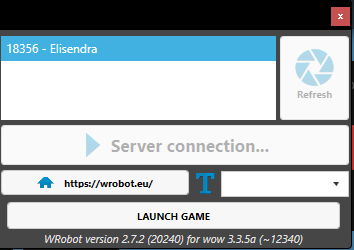
  3. Whenever I open the WRobot no mater which version I choose it gets stuck on "Server connection..." then the error message "Servers seem to be down ....." appears and the program closes automatically before I can do anything.
Account

Navigation

Search

Search

Configure browser push notifications

Chrome (Android)
  1. Tap the lock icon next to the address bar.
  2. Tap Permissions → Notifications.
  3. Adjust your preference.
Chrome (Desktop)
  1. Click the padlock icon in the address bar.
  2. Select Site settings.
  3. Find Notifications and adjust your preference.