Skip to content
View in the app

A better way to browse. Learn more.

WRobot

A full-screen app on your home screen with push notifications, badges and more.

To install this app on iOS and iPadOS
  1. Tap the Share icon in Safari
  2. Scroll the menu and tap Add to Home Screen.
  3. Tap Add in the top-right corner.
To install this app on Android
  1. Tap the 3-dot menu (⋮) in the top-right corner of the browser.
  2. Tap Add to Home screen or Install app.
  3. Confirm by tapping Install.

dmxf

Members
  • Joined

  • Last visited

  1.    fengshibang reacted to a post in a topic: Unable to find WOW process
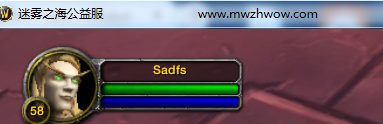
  2. @Droidz HI,Droidz Now there are many servers that prevent Bot from being linked to games by modifying the process name of World of Warcraft. 3/5000 Like this,So WRobot cannot find the process.What is the solution to this problem?
  3. 我也是这个情况
  4. dmxf posted a bug report in Bug Tracker
    I used it all before when I tried it. After I bought the official version, I found that I can't use it. I have been reporting an error. I tried to reinstall the system and delete the HOSTS file, but I still can't use it. Please help me.

Account

Navigation

Search

Search

Configure browser push notifications

Chrome (Android)
  1. Tap the lock icon next to the address bar.
  2. Tap Permissions → Notifications.
  3. Adjust your preference.
Chrome (Desktop)
  1. Click the padlock icon in the address bar.
  2. Select Site settings.
  3. Find Notifications and adjust your preference.