wizardcho
Members
-
Joined
-
Last visited
-
-
Coordinate in wowhead map http://www.wowhead.com/maps?data=5842:475819 17:30:08 - Go to Digsite Sik'vess Digsite 17:30:08 - Mounting fly mount Sunstone Panther [D] 17:30:48 - UnStuck() started. [D] 17:30:48 - Flying UnStuck - Statistics.Stucks updated, new value: 1. [D] 17:30:49 - Flying UnStuck - lastPost = 1422,243 ; 4352,62 ; 257,8896 ; "Flying" [D] 17:30:51 - UnStuckFly() done. [D] 17:30:59 - UnStuck() started. [D] 17:31:00 - Flying UnStuck - Statistics.Stucks updated, new value: 2. [D] 17:31:00 - Flying UnStuck - lastPost = 1422,381 ; 4353,288 ; 240,4388 ; "Flying" [D] 17:31:02 - UnStuckFly() done. [D] 17:31:10 - UnStuck() started. [D] 17:31:10 - Flying UnStuck - Statistics.Stucks updated, new value: 3. [D] 17:31:10 - Flying UnStuck - lastPost = 1423,094 ; 4353,14 ; 230,4537 ; "Flying" [D] 17:31:12 - UnStuckFly() done. 17:31:22 - Stop Archaeologist Complete
-
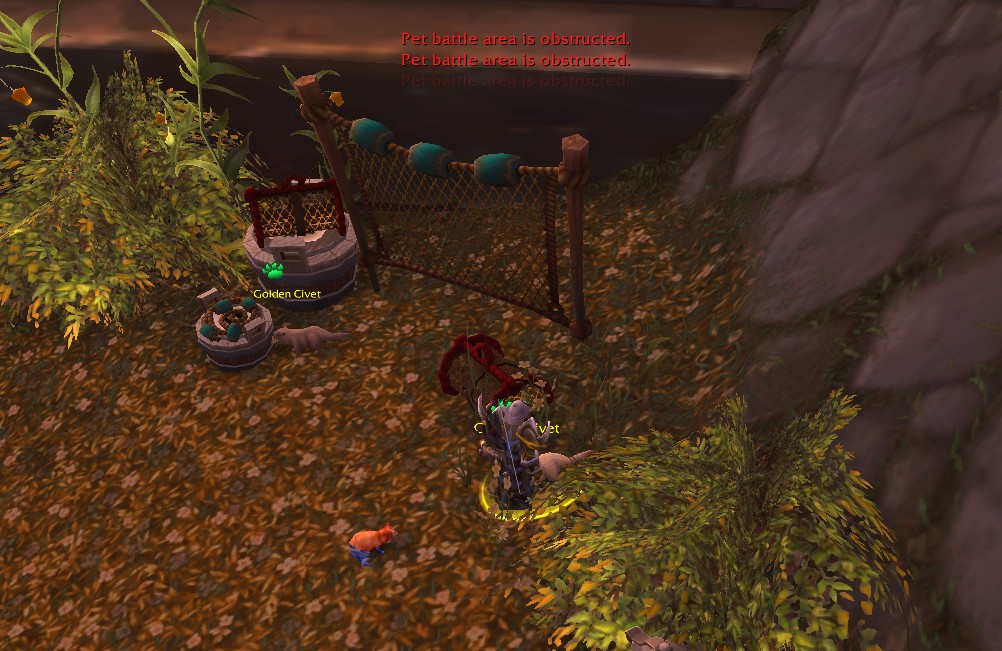
today i saw new update but problem is not fixed or script not work well http://www.wowhead.com/maps?data=5840:111683 these 2 pets on screenshot are buged and when try to battle in 0-5 range yards from them, zone is obstructed
-
sometime when use pet battle i am stuck on pet and cant begin battle. can you make script that when area is obstructed character to move 10 yards back and interact again (or to interract with pets from 10 yards range). In my case when i am to 0-5 range from npc pet area is obstructed but when move to 10 range i can begin battles.
-
How to ignore Legendary Elite in Valley of Four winds with name "Lucky Ti"?