



Skip to content
View in the app

A better way to browse. Learn more.

WRobot

A full-screen app on your home screen with push notifications, badges and more.

To install this app on iOS and iPadOS
  1. Tap the Share icon in Safari
  2. Scroll the menu and tap Add to Home Screen.
  3. Tap Add in the top-right corner.
To install this app on Android
  1. Tap the 3-dot menu (⋮) in the top-right corner of the browser.
  2. Tap Add to Home screen or Install app.
  3. Confirm by tapping Install.

nilo

Members
  • Joined

  • Last visited

  1. here 14 mai 2022 14H41.log.html
  2. 5000 - 7000 and still the same
  3. add more in min or max or both?
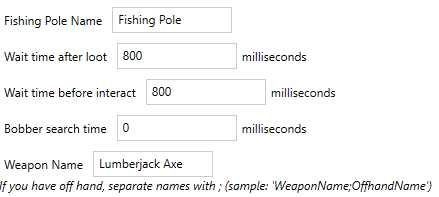
  4. try diferents types of latency between 400 - 900 . The latency helps with casting loop, but now the bot dont click the right time. always show "no fish are hooked"
  5. where?
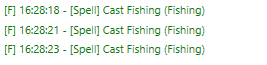
  6. My fhisherbot dont hook. keep casting every 30 seconds I found it on other old threads(more than a year ago) but all of them the solution was "update wrobot". I believe that is my bad config couse I new at botting stuff.
Account

Navigation

Search

Search

Configure browser push notifications

Chrome (Android)
  1. Tap the lock icon next to the address bar.
  2. Tap Permissions → Notifications.
  3. Adjust your preference.
Chrome (Desktop)
  1. Click the padlock icon in the address bar.
  2. Select Site settings.
  3. Find Notifications and adjust your preference.