




BusyAtSchool
Members
-
Joined
-
Last visited
-
Thank you! I will test this today.
-
Good afternoon, I am trying to move through an area that is well over my level. Unfortunately, when I revive - I get attacked and die, so I am trying to revive to the furthest point to continue forward. Is there a way that I can have a plug-in run me back to my body and then just stop? I attempted to use this code below, but it halts the bot at the Spirit Healer. I want to stop the bot, at my dead corpse, before resurrecting. using System.Threading; using wManager.Wow.Bot.States; public class Main : wManager.Plugin.IPlugin { public void Initialize() { robotManager.Events.FiniteStateMachineEvents.OnRunState += (engine, state, cancelable) => { if (state is Resurrect || state is ResurrectBG) { robotManager.Products.Products.ProductStop(); } }; } public void Dispose() { } public void Settings() { } }
-
Thanks, I will give the plugin a try!
-
Nope. I will get attacked by elites and my guy fights back until death..
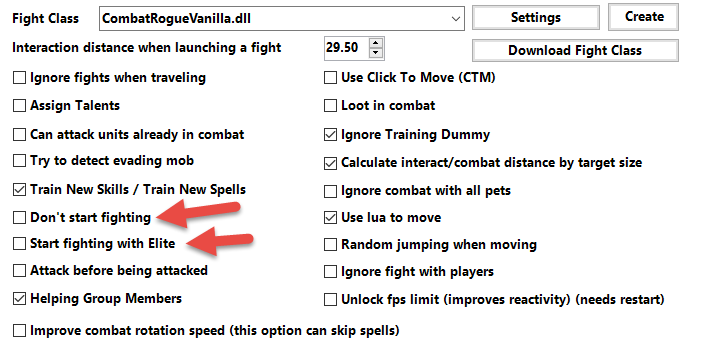
-
Paid Version - How Do I Run Away From Elites and Not Fight Them. I consistently die to elite mobs that roam the areas that I want to grind. How do i avoid them? I have tried black listing areas, which works somewhat, but other elites roam and makes it impossible. Thanks in advance.