Skip to content
View in the app

A better way to browse. Learn more.

WRobot

A full-screen app on your home screen with push notifications, badges and more.

To install this app on iOS and iPadOS
  1. Tap the Share icon in Safari
  2. Scroll the menu and tap Add to Home Screen.
  3. Tap Add in the top-right corner.
To install this app on Android
  1. Tap the 3-dot menu (⋮) in the top-right corner of the browser.
  2. Tap Add to Home screen or Install app.
  3. Confirm by tapping Install.

0x22Fenrir

WRobot user
  • Joined

  • Last visited

  1. @Droidzis there anyway to purchase a Lifetime License.
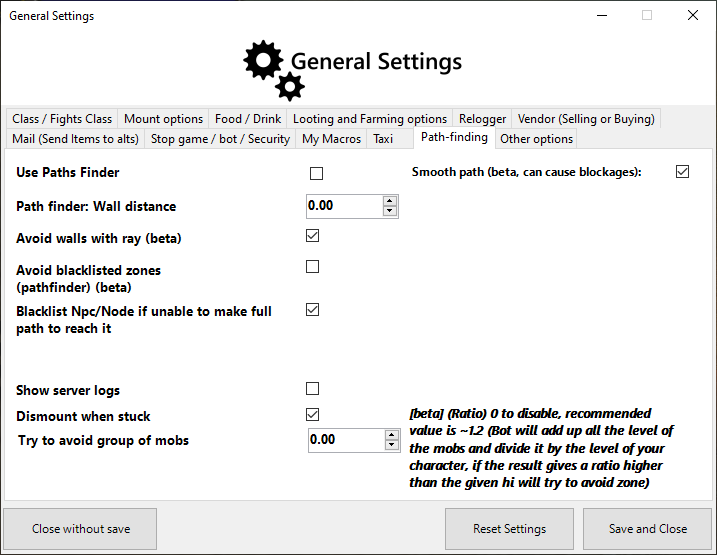
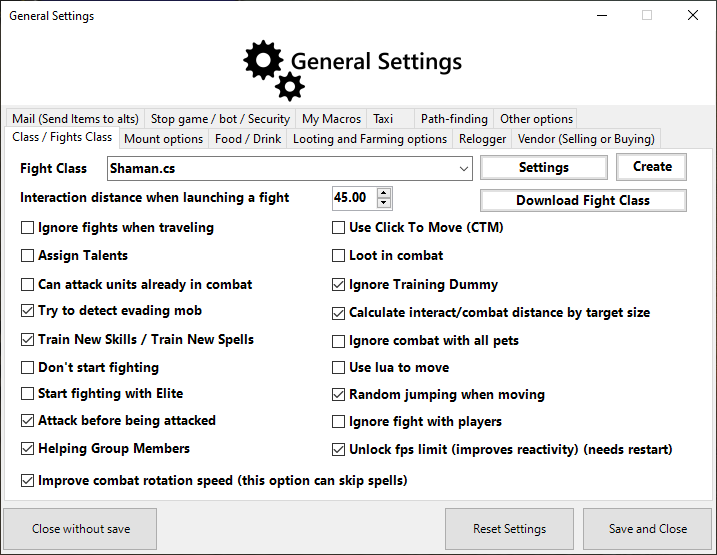
  2. TO USE your BOT CURRENTLY WITH PATHFINDER DOWN DO THIS: GOTO THE Gear Icon on your bot. Then goto the "Enter advanced settings > goto the Pathfinder tab and uncheck all the boxes within the pathfinder tab. After you uncheck all pathing boxes goto the gnetal tab in the "Enter advanced setting menu .. disable use .lua to move. after this is done exit here and load your quest via - Quester. Fix Created / Discovered By : - 0x22Fenrir
  3.    0x22Fenrir reacted to a post in a topic: Server Down?
  4.    0x22Fenrir reacted to a post in a topic: Server Down?
  5. the bot is up now (no longer saying "Server Connection...) but now it states my antivirus is getting in the way, but my antivirus is off. 1
  6. When starting Wrobot just a few minutes ago the bot says "Server Connection..." Is the AUTH Server down?

Account

Navigation

Search

Search

Configure browser push notifications

Chrome (Android)
  1. Tap the lock icon next to the address bar.
  2. Tap Permissions → Notifications.
  3. Adjust your preference.
Chrome (Desktop)
  1. Click the padlock icon in the address bar.
  2. Select Site settings.
  3. Find Notifications and adjust your preference.