



Skip to content
View in the app

A better way to browse. Learn more.

WRobot

A full-screen app on your home screen with push notifications, badges and more.

To install this app on iOS and iPadOS
  1. Tap the Share icon in Safari
  2. Scroll the menu and tap Add to Home Screen.
  3. Tap Add in the top-right corner.
To install this app on Android
  1. Tap the 3-dot menu (⋮) in the top-right corner of the browser.
  2. Tap Add to Home screen or Install app.
  3. Confirm by tapping Install.

sharif

Members
  • Joined

  • Last visited

Everything posted by sharif

  1. Thank you @Droidz but the thing is i buy this profile in public wifi and after i come home to configure the wrobot and do every thing needed it gave me this issue. hopefully @Bambo contact me soon
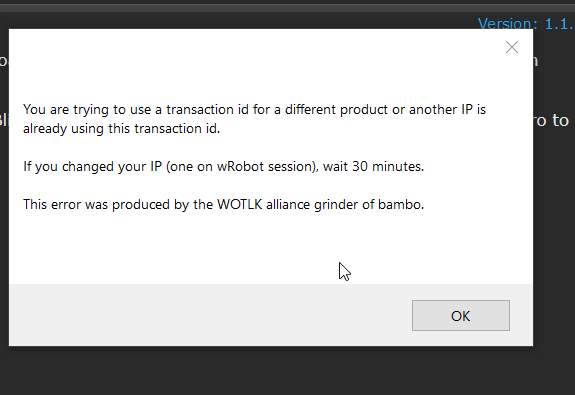
  2. Hi , I have a issue on the the bambos profile whenever it is loading after a certain time it closes the wrobot with this message about using another ip . I had an issue of the bot so i delete it and installed again . I think there is a issue may caused the trouble Though it said use to wait after 30 min which i did and wait for 50 min but the issue it is still presist .
Account

Navigation

Search

Search

Configure browser push notifications

Chrome (Android)
  1. Tap the lock icon next to the address bar.
  2. Tap Permissions → Notifications.
  3. Adjust your preference.
Chrome (Desktop)
  1. Click the padlock icon in the address bar.
  2. Select Site settings.
  3. Find Notifications and adjust your preference.