



Skip to content
View in the app

A better way to browse. Learn more.

WRobot

A full-screen app on your home screen with push notifications, badges and more.

To install this app on iOS and iPadOS
  1. Tap the Share icon in Safari
  2. Scroll the menu and tap Add to Home Screen.
  3. Tap Add in the top-right corner.
To install this app on Android
  1. Tap the 3-dot menu (⋮) in the top-right corner of the browser.
  2. Tap Add to Home screen or Install app.
  3. Confirm by tapping Install.

mxxt11

Members
  • Joined

  • Last visited

Everything posted by mxxt11

  1. mxxt11 posted a topic in Deutsch
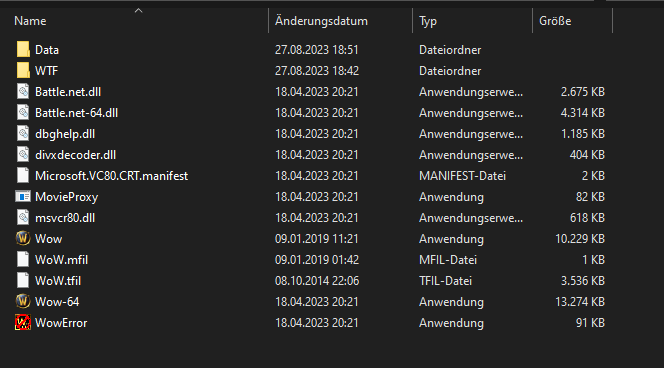
    Hallo Zusammen, ich bin neu hier und wollte gerne den Bot testen. Der Bot startet das Game und sagt dann das die Version falsch ist. Ich habe bisschen recherchiert und habe gesehen das der Bot 32 Bit Version starten kann ich habe aber in meinem Wow Ordner nur die 64 Version und auch keinen Launcher oder sowas. Anbei einmal ein Screenshot: Jetzt meine Frage wie kann ich das Problem fixxen und den Bot testen. Wenn der Bot wirklich so gut funktioniert wie alle sagen würde ich direkt nach dem kurzen Test den Bot kaufen. Danke im Vorraus. Beste Grüße.
Account

Navigation

Search

Search

Configure browser push notifications

Chrome (Android)
  1. Tap the lock icon next to the address bar.
  2. Tap Permissions → Notifications.
  3. Adjust your preference.
Chrome (Desktop)
  1. Click the padlock icon in the address bar.
  2. Select Site settings.
  3. Find Notifications and adjust your preference.