



Skip to content
View in the app

A better way to browse. Learn more.

WRobot

A full-screen app on your home screen with push notifications, badges and more.

To install this app on iOS and iPadOS
  1. Tap the Share icon in Safari
  2. Scroll the menu and tap Add to Home Screen.
  3. Tap Add in the top-right corner.
To install this app on Android
  1. Tap the 3-dot menu (⋮) in the top-right corner of the browser.
  2. Tap Add to Home screen or Install app.
  3. Confirm by tapping Install.

booty bay path finder fath bug

  • Product: WRobot General
  • Type: Bug
  • Status: Unconfirmed

The following type of problem, the bot cannot find a route to the pier in the booty bay, when the bot is outside the bay area, it ignores the tunnel that leads to the bay and chooses a bypass route through the water and then jumps under the pier in the water, although the point is higher:
[D] 19:42:00 - [Quester] RunCode[2]: //spot test
wManager.Wow.Bot.Tasks.GoToTask.ToPosition(new Vector3(-14290.09, 540.8121, 8.756604, "None"));
[N] 19:42:00 - [Path-Finding] FindPath from -14248,63 ; 327,3172 ; 24,39926 ; "None" to -14290,09 ; 540,8121 ; 8,756604 ; "None" (Azeroth)
[N] 19:42:01 - [Path-Finding] Path Count: 16 (435,0354y, 400ms) (resultPartial=True, resultSuccess=True (more info with server log option))
I am attaching a test profile of the quester that I used
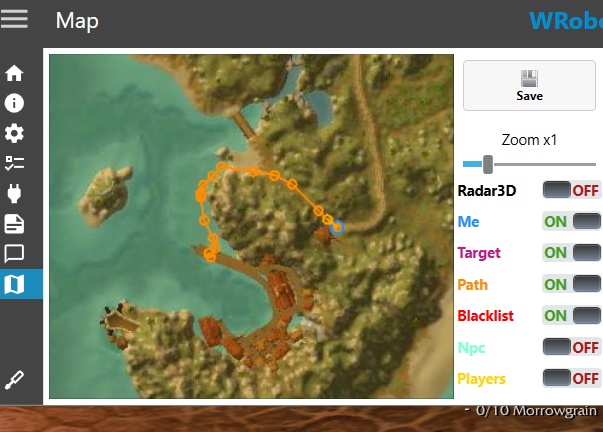
wrong path booty.png

bootybaytest.xml

User Feedback

Recommended Comments

Hello, On which version of the game are you experiencing this issue?

Pudge

WRobot user

wotlk 3.3.5a
It is noteworthy that if the point is a little closer to the tunnel, literally 30-40 yards +- then the route is built correctly

Would blacklisting the area I roughly circled fix the problem?

chrome_JmtewGRAxE.png

Pudge

WRobot user

didn't help
 [Path-Finding] FindPath from -14247,7 ; 327,8704 ; 24,22789 ; "None" to -14290,09 ; 540,8121 ; 8,756604 ; "None" (Azeroth)
[N] 23:13:03 - [Path-Finding] Path Count: 29 (1114,047y, 214ms) (resultPartial=True, resultSuccess=True (more info with server log option))
 

sdbaga.png

bfsbsfbg.png

I apologize, but I cannot deploy a generic solution to fix this issue. If you're going to specific positions, you can use Off Mesh Connections on your side to resolve it. Attached to this message is an example that solves exactly the problem from your starting position to your destination position.

vmware_9XIm9NNusV.png

OffMeshConnections.xml

Create an account or sign in to comment

Account

Navigation

Search

Search

Configure browser push notifications

Chrome (Android)
  1. Tap the lock icon next to the address bar.
  2. Tap Permissions → Notifications.
  3. Adjust your preference.
Chrome (Desktop)
  1. Click the padlock icon in the address bar.
  2. Select Site settings.
  3. Find Notifications and adjust your preference.