



Skip to content
View in the app

A better way to browse. Learn more.

WRobot

A full-screen app on your home screen with push notifications, badges and more.

To install this app on iOS and iPadOS
  1. Tap the Share icon in Safari
  2. Scroll the menu and tap Add to Home Screen.
  3. Tap Add in the top-right corner.
To install this app on Android
  1. Tap the 3-dot menu (⋮) in the top-right corner of the browser.
  2. Tap Add to Home screen or Install app.
  3. Confirm by tapping Install.

Bot stops working

  • Version: All
  • Product: WRobot General
  • Type: Bug
  • Status: Not a Bug

1st of all love this program, but I'm getting an error when it's left for a little time running and can happen at any time ,and will not continue until I click ok , which is a real pain , on the other hand I can fish in a spot for hours and hours and works great ? .... I have uninstalled and deleted and reinstalled and I'm still getting the same problem , it happens when gathering or just in general killing npc's on a path finder I have made my self , I can come back after a while and he is just stood there with this error , but as I say with fishing or anything used standing still for hours works fine and also one more thing I'm on the unlimited subscription and when I try to run a second bot it closes the other down ?
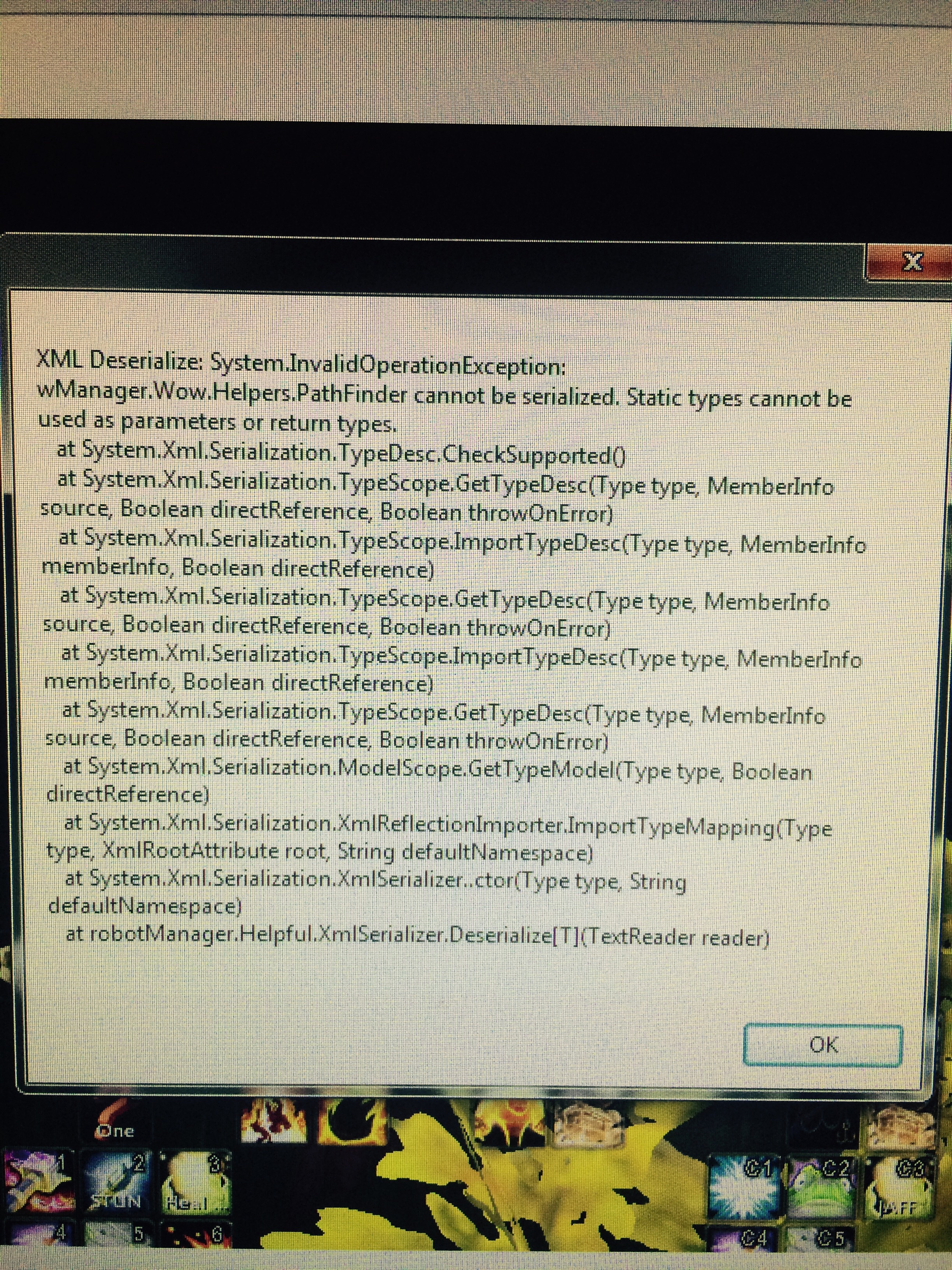
image.jpg

User Feedback

Recommended Comments

Procel

Members

I thought maybe some one had my key but when I do fishing no problems at all?

Procel

Members

im hoping the admin can help soon please , and thank you 

Procel

Members

I don't use windows 10 , but is this the problem frame works? Should I just download latest version? And everything will be ok? And one question why does it not affect fishing but everything else...

I have found others problem similar at your problem on google (for others software), update framework seem resolve the problem. Try and tell me if this works.

BetterSister

Elite user

Changed Status to Not a Bug

Changed Version to All

Create an account or sign in to comment

Account

Navigation

Search

Search

Configure browser push notifications

Chrome (Android)
  1. Tap the lock icon next to the address bar.
  2. Tap Permissions → Notifications.
  3. Adjust your preference.
Chrome (Desktop)
  1. Click the padlock icon in the address bar.
  2. Select Site settings.
  3. Find Notifications and adjust your preference.