




Skip to content
View in the app

A better way to browse. Learn more.

WRobot

A full-screen app on your home screen with push notifications, badges and more.

To install this app on iOS and iPadOS
  1. Tap the Share icon in Safari
  2. Scroll the menu and tap Add to Home Screen.
  3. Tap Add in the top-right corner.
To install this app on Android
  1. Tap the 3-dot menu (⋮) in the top-right corner of the browser.
  2. Tap Add to Home screen or Install app.
  3. Confirm by tapping Install.

Cash when i use 3-sessions

  • Version: All
  • Product: WRobot General
  • Type: Bug
  • Status: Not a Bug

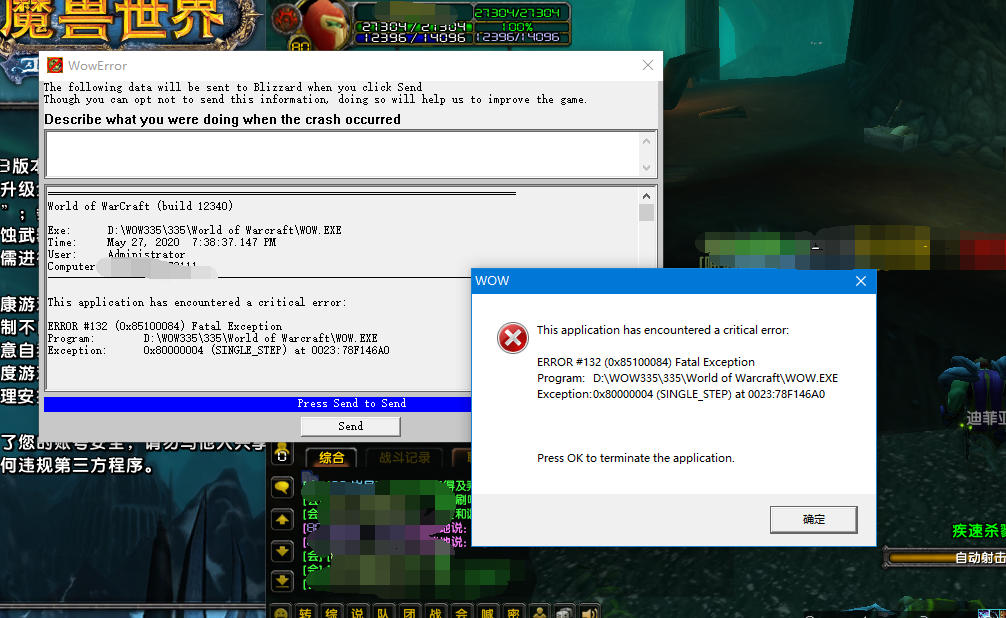
When I use one key for two windows, I always get an error after 1 minute.

Also explain: I used two separate 1 sessions before, and this has never happened. Today, after the administrator upgraded my key to 3 sessions, one of the games above two windows always crashed.

i use win10 64,,i9 9900k ,2080ti and 16GMemory ,In general, my CPU share of three game windows is 15% - 20%.i dont know why,please help me.thx


Attached Files:
User Feedback

Recommended Comments

Hello, when you upgrade your key to need to restart all running sessions to apply new limit.  You should no longer have this problem.

Create an account or sign in to comment

Account

Navigation

Search

Search

Configure browser push notifications

Chrome (Android)
  1. Tap the lock icon next to the address bar.
  2. Tap Permissions → Notifications.
  3. Adjust your preference.
Chrome (Desktop)
  1. Click the padlock icon in the address bar.
  2. Select Site settings.
  3. Find Notifications and adjust your preference.