



Skip to content
View in the app

A better way to browse. Learn more.

WRobot

A full-screen app on your home screen with push notifications, badges and more.

To install this app on iOS and iPadOS
  1. Tap the Share icon in Safari
  2. Scroll the menu and tap Add to Home Screen.
  3. Tap Add in the top-right corner.
To install this app on Android
  1. Tap the 3-dot menu (⋮) in the top-right corner of the browser.
  2. Tap Add to Home screen or Install app.
  3. Confirm by tapping Install.

Draw3D Vector on screen

  • Version: All
  • Product: WRobot General
  • Type: Bug
  • Status: Not a Bug

Not sure if you can do anything about this but the Draw3D stuff doesn't actually display where the mob/gameobject is correctly on your screen, it seems to be offset. The below is using target position to draw the circle however it seems to be below/behind the mob.
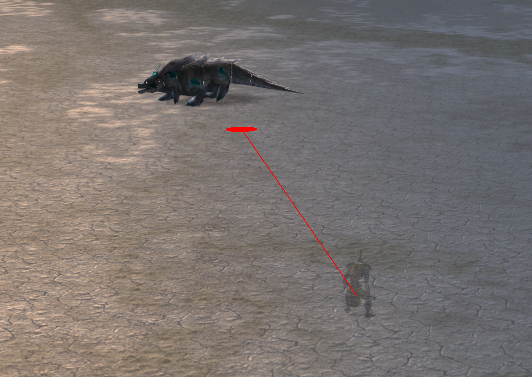
3734e6958b7818b8f846d13659ec6e60.png

User Feedback

Recommended Comments

Marsbar

Elite user

Another example (the further away the mob is, the more incorrect the draw vector is):
50d334e50ed006042e4998dd2152e9f6.png

Marsbar

Elite user
15 minutes ago, Droidz said:

Hello, do you run wow in fullscreen or maximized window?

maximized window

it is for that, resize window manually, radar3d don't support fullscreen / maximized window

Marsbar

Elite user

Also does not work in windowed mode:

1ac272449b1bc5e1a6ed26b3bcf4b65e.jpg

Marsbar

Elite user
foreach (WoWUnit Mob in ObjectManager.GetObjectWoWUnit().Where(x => obj.Contains(x.Name)))
                    {
                        Radar3D.DrawCircle(Mob.Position, 1f, System.Drawing.Color.Yellow, true);
                        Radar3D.DrawLine(Mob.Position, ObjectManager.Me.Position, System.Drawing.Color.Yellow);                        
                        //Radar3D.DrawString(Mob.Name, Mob.Position, 5f, System.Drawing.Color.Yellow, 255, System.Drawing.FontFamily.GenericMonospace);
                    }

Default radar 3d is also not correct for me

Marsbar

Elite user

Tried different resolutions, also doesn't work correctly. I'm on vanilla if that makes any difference.

Create an account or sign in to comment

Account

Navigation

Search

Search

Configure browser push notifications

Chrome (Android)
  1. Tap the lock icon next to the address bar.
  2. Tap Permissions → Notifications.
  3. Adjust your preference.
Chrome (Desktop)
  1. Click the padlock icon in the address bar.
  2. Select Site settings.
  3. Find Notifications and adjust your preference.