Skip to content
View in the app

A better way to browse. Learn more.

WRobot

A full-screen app on your home screen with push notifications, badges and more.

To install this app on iOS and iPadOS
  1. Tap the Share icon in Safari
  2. Scroll the menu and tap Add to Home Screen.
  3. Tap Add in the top-right corner.
To install this app on Android
  1. Tap the 3-dot menu (⋮) in the top-right corner of the browser.
  2. Tap Add to Home screen or Install app.
  3. Confirm by tapping Install.

Error during hook test

  • Product: WRobot General
  • Type: Bug
  • Status: Unconfirmed

Using direct exe (Wrobot.exe). Without relogger. Some bots are fine, others stuck with this (same game version, same realm for all of them). It's a Wotlk, so there is no directx setting at ingame options. The onli thing that helps is to reboot whole pc, that's sometimes help, sometimes not. But this method is annoing anyway beacause i have to stop everiothing that is going on at this PC and then restart it all.

The error itself:
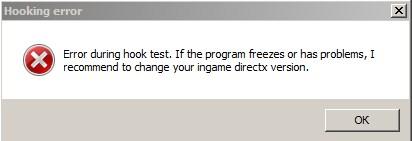
Screenshot_5.jpg.c1e7342d287c7e6fd9f9b93adad52bf6.jpg

Program versions:

Screenshot_6.jpg.11478c87090d1cfbdf685743d416478a.jpg

and

Screenshot_7.jpg.eff201911a7d34e32a735017feb8d207.jpg

I asume it may be on my side. What should i check first? Thank you.

User Feedback

Recommended Comments

In last update I changed default hook type, if you haven't problem before last update run WRobot with shortcut "WRobot Dx" (few software like antivirus or malwarebyte can cause problem)

Create an account or sign in to comment

Account

Navigation

Search

Search

Configure browser push notifications

Chrome (Android)
  1. Tap the lock icon next to the address bar.
  2. Tap Permissions → Notifications.
  3. Adjust your preference.
Chrome (Desktop)
  1. Click the padlock icon in the address bar.
  2. Select Site settings.
  3. Find Notifications and adjust your preference.