Skip to content
View in the app

A better way to browse. Learn more.

WRobot

A full-screen app on your home screen with push notifications, badges and more.

To install this app on iOS and iPadOS
  1. Tap the Share icon in Safari
  2. Scroll the menu and tap Add to Home Screen.
  3. Tap Add in the top-right corner.
To install this app on Android
  1. Tap the 3-dot menu (⋮) in the top-right corner of the browser.
  2. Tap Add to Home screen or Install app.
  3. Confirm by tapping Install.

Have a few

  • Product: WRobot General
  • Type: Suggestion
  • Status: Fixed

Suggestions for BOT:

  1. If target immune select next hostile
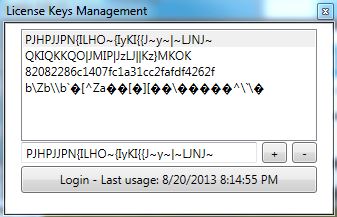
  2. dropbox licensing issue - maybe a way to name the licenses I Add (I have WRobot installed on my dropbox drive, it works great however I have to add a license for each machine I use. And it shows like in attached file. Would be nice if I could label them)ccs-3500-0-69107400-1377227516_thumb.jpg
  3. Random speech in BG (Maybe predefined list of phrases, something I could customize)
  4. Customizable speech for when it runs the "unstuck" part of bot. Same as above, customizable set of phrases it will say something when runs the unstuck.
  5. Time offset for battlegrounder - Join every 20min after battle ends (For using battlegrounder and Gatherer/Grinder together. Otherwise it only gathers for like 2min. Maybe let it gather for 20-30min before requeueing)
  6. Keep on top option. Force it to stay on top of all other windows.

Suggestions for Website:

  1. Make sure pricing is shown in correct currency. If possible add currency converters. Currently it just shows numbers ie: 24.99, but no idea if that is US dollars...Yen, Euro...so on. :)

All I have for now. :)


Attached Files:
User Feedback

Recommended Comments

Hi,


Thanks for report.


1. I am not sure to understand correctly, but normally if target seem blocked (or immune) wrobot blacklist it and go to next objective.

2. I crypt license key (and your wow account information if you use relogger) for avoid problem of hack, I'll don't change it.

3/4. I'll give thought to add possibility to speak, but the bot can be dangerous for your account if the speech is bad.

5/6: I'll add it.

Create an account or sign in to comment

Account

Navigation

Search

Search

Configure browser push notifications

Chrome (Android)
  1. Tap the lock icon next to the address bar.
  2. Tap Permissions → Notifications.
  3. Adjust your preference.
Chrome (Desktop)
  1. Click the padlock icon in the address bar.
  2. Select Site settings.
  3. Find Notifications and adjust your preference.