Skip to content
View in the app

A better way to browse. Learn more.

WRobot

A full-screen app on your home screen with push notifications, badges and more.

To install this app on iOS and iPadOS
  1. Tap the Share icon in Safari
  2. Scroll the menu and tap Add to Home Screen.
  3. Tap Add in the top-right corner.
To install this app on Android
  1. Tap the 3-dot menu (⋮) in the top-right corner of the browser.
  2. Tap Add to Home screen or Install app.
  3. Confirm by tapping Install.

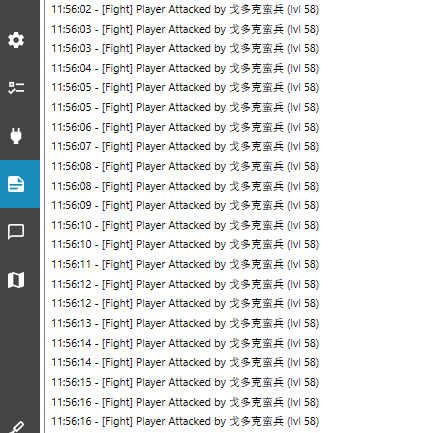
How to stop fighting threads In Quest mode

  • Version: All
  • Product: WRobot General
  • Type: Bug
  • Status: Not a Bug

 Fight.StopFight(); 

微信图片_20230713115740.png

User Feedback

Recommended Comments

wow20230625

Members

 Fight.StopFight();  Using this method is invalid

wow20230625

Members
6 hours ago, Droidz said:

Hello, 


Thank you,The problem is resolved.

wow20230625

Members
6 hours ago, Droidz said:

Hello, 


I have two questions to ask
1.How to make the pet use “MoveManager”
2.How to use “MoveManager” in the state the soul

Create an account or sign in to comment

Account

Navigation

Search

Search

Configure browser push notifications

Chrome (Android)
  1. Tap the lock icon next to the address bar.
  2. Tap Permissions → Notifications.
  3. Adjust your preference.
Chrome (Desktop)
  1. Click the padlock icon in the address bar.
  2. Select Site settings.
  3. Find Notifications and adjust your preference.