Skip to content
View in the app

A better way to browse. Learn more.

WRobot

A full-screen app on your home screen with push notifications, badges and more.

To install this app on iOS and iPadOS
  1. Tap the Share icon in Safari
  2. Scroll the menu and tap Add to Home Screen.
  3. Tap Add in the top-right corner.
To install this app on Android
  1. Tap the 3-dot menu (⋮) in the top-right corner of the browser.
  2. Tap Add to Home screen or Install app.
  3. Confirm by tapping Install.

I'm not sure, that bug, but...

  • Product: WRobot General
  • Type: Bug
  • Status: Unconfirmed

Hi @Droidz,
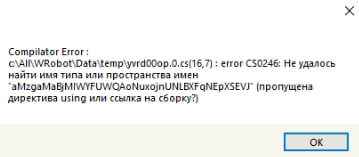
I don’t know why, but when I use Wrobot for a long time, after a while, it stops working. I can use it for 10 or 20 hours, and it still works fine. However, when I use Wrobot for 3-5 hours, the bot crashes and gives me errors, it doesn't load profiles until I reload PC. then works fine again. 

I'm not sure if this is a bug, but I would appreciate your opinion on the matter. I’ve attached a screenshot of the error, maybe you can help me figure it out or, if it's a bug, help fix it.
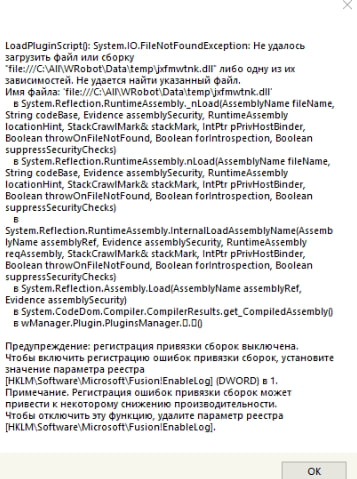
image.png.1eab2c4388248c311a6de7cad0175410.pngimage.png.7417b5f47fba4a4f186f648abbcd37dd.png

User Feedback

Recommended Comments

Sakonung

Members

I’m running bots on 3 PCs, and each of them has enough RAM and space on the C drive. It doesn’t depend on that. I thought the same, so I expanded the disk space, upgraded the RAM, and added a new SSD — no difference. I also reinstalled .NET, but that didn’t help either.

The strange thing is that everything works fine when running 1-10 bots, but when the total reaches 30-40 simultaneously, after a long period of operation, .dll errors start appearing.

Do you use Relogger? If yes, try to restart bot/game more frequently (like every 6h). Or use one WRobot folder per game, but that requires much more work for maintenance.

Sakonung

Members

Yes, I'm using Relogger for this. As I understand it, I have to use 1 Wrobot folder for 1 Wow client, right? 

If you use the "Relogger" you can try to schedule a bot restart every X hours. You can try on a bot to separate its folder (1 wrobot folder for 1 wow) to see if it solves the problem.

Create an account or sign in to comment

Account

Navigation

Search

Search

Configure browser push notifications

Chrome (Android)
  1. Tap the lock icon next to the address bar.
  2. Tap Permissions → Notifications.
  3. Adjust your preference.
Chrome (Desktop)
  1. Click the padlock icon in the address bar.
  2. Select Site settings.
  3. Find Notifications and adjust your preference.