




Skip to content
View in the app

A better way to browse. Learn more.

WRobot

A full-screen app on your home screen with push notifications, badges and more.

To install this app on iOS and iPadOS
  1. Tap the Share icon in Safari
  2. Scroll the menu and tap Add to Home Screen.
  3. Tap Add in the top-right corner.
To install this app on Android
  1. Tap the 3-dot menu (⋮) in the top-right corner of the browser.
  2. Tap Add to Home screen or Install app.
  3. Confirm by tapping Install.

Isle of Thunder - Server side pathfinding bug

  • Version: All
  • Product: WRobot General
  • Type: Bug
  • Status: Fixed

here (or near that spot)

Map name MPQ: MoguIslandDailyArea

My Position: 6975.315, 5187.96, 66.03867, "None"
My Position Vector: new Vector3(6975.315, 5187.96, 66.03867, "None")
My Position XML: <Vector3 X="6975.315" Y="5187.96" Z="66.03867" Type="None" />
My Rotation: 5,898219
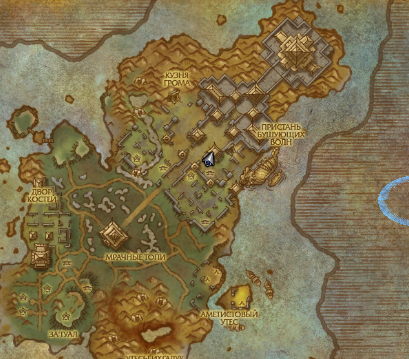
image.png.f61bd597e928be1308d2c07be8aa09f1.png

if i enable server side pathfinding

3rANtEs.png

then wrobot tryed to walk thru wall 

image.thumb.png.a7676b18316c8929e871bb8f02d63af6.png


if i disable server pathfinding, everything works fine

9vuOnwb.jpg

no offmesh connections in profile for this continent

stuck log

[N] 05:18:34 - [Path-Finding] FindPath from 6975,315 ; 5187,96 ; 66,03867 ; "None" to 7073,398 ; 5179,925 ; 66,0382 ; "None" (MoguIslandDailyArea)
[N] 05:18:36 - [Path-Finding] Path Count: 4 (103,5525y)
[N] 05:18:39 - [MovementManager] Think we are stuck
[N] 05:18:39 - [MovementManager] Trying something funny, hang on


User Feedback

Recommended Comments

Hello, it is not really bug, in new mesh I added most of gameobjects (to avoid stucks), in this gameobjects they are probably door closed, to resolve this problem use offmeshconnetions:

  <OffMeshConnection>
    <Path>
      <Vector3 X="7071.287" Y="5205.807" Z="66.03905" />
      <Vector3 X="7003.947" Y="5274.675" Z="84.44761" />
      <Vector3 X="6953.603" Y="5222.888" Z="75.49843" />
    </Path>
    <ContinentId>1064</ContinentId>
    <Name>The Foot of Lei Shen</Name>
  </OffMeshConnection>
  <OffMeshConnection>
    <Path>
      <Vector3 X="6953.603" Y="5222.888" Z="75.49843" />
      <Vector3 X="7004.001" Y="5273.199" Z="84.44643" />
      <Vector3 X="7071.814" Y="5203.753" Z="66.03793" />
    </Path>
    <ContinentId>1064</ContinentId>
    <Name>Stormsea Landing</Name>
  </OffMeshConnection>

I'll blacklist this door for the next mesh update

salopiat

Members

very please dont disable old meshes until next addon or i kill myself.

camelot10

Elite user

i dont know if you changed logic of offmesh connections. but as far i know how it work before: offmeshes checked only if path not finded. according to log server find path (thru walls) and didnt use any offmesh connections. correct me if i wrong

26 minutes ago, camelot10 said:

i dont know if you changed logic of offmesh connections. but as far i know how it work before: offmeshes checked only if path not finded. according to log server find path (thru walls) and didnt use any offmesh connections. correct me if i wrong

I have not changed that, your offmeshes does not work anymore?

camelot10

Elite user
(edited)

its worked.

BUT what i noticed, let me explain.

we have position A and position B.

case1: pathfinder find path from A to B without offmesh connections, then pathfinder dont even check offmesh connections.

case2: pathfinder didnt find path from A to B withoutoffmesh connection, then pathfinder try to search path with offmesh connections.

in this case, in isle of thunder, server pathfinder successfully find path from A to B without offmesh (according to my log posted above) and dont even check offmesh connections. and that path lead thru wall

but i can check it directly if you want

Edited by camelot10

In advanced general settings you need to activate option "Show server logs" to show in your log when it is patial result.

You can try this code:

        Logging.Write("Without meshconnetions");
        wManager.wManagerSetting.CurrentSetting.PathFinderFromServer = true;
        wManager.wManagerSetting.CurrentSetting.PathFinderRequestLog = true;
        wManager.Wow.Helpers.PathFinder.FindPath(new Vector3(6975.315, 5187.96, 66.03867), new Vector3(7073.398, 5179.925, 66.0382), "MoguIslandDailyArea");
        Logging.Write("With meshconnetions");
        wManager.Wow.Helpers.PathFinder.OffMeshConnections.Add(new PathFinder.OffMeshConnection(new List<Vector3> { new Vector3(7076.924, 5200.99, 66.03947), new Vector3(7025.558, 5252.079, 84.2523) }, 1064));
        wManager.Wow.Helpers.PathFinder.OffMeshConnections.Add(new PathFinder.OffMeshConnection(new List<Vector3> { new Vector3(7025.558, 5252.079, 84.2523), new Vector3(7076.924, 5200.99, 66.03947) }, 1064));
        wManager.Wow.Helpers.PathFinder.FindPath(new Vector3(6975.315, 5187.96, 66.03867), new Vector3(7073.398, 5179.925, 66.0382), "MoguIslandDailyArea");
        wManager.Wow.Helpers.PathFinder.OffMeshConnections.Load(); // reset offmeshes

result (in log):

Quote

11:12:37.612 - Without meshconnetions
[N] 11:12:37.617 - [Path-Finding] FindPath from 6975,315 ; 5187,96 ; 66,03867 ; "None" to 7073,398 ; 5179,925 ; 66,0382 ; "None" (MoguIslandDailyArea)
[N] 11:12:37.852 - [Server] [Path-Finding] Partial result: 6975,315 ; 5187,96 ; 66,03867 ; "None" (MoguIslandDailyArea_22,27258_18,92129) to 7073,398 ; 5179,925 ; 66,0382 ; "None" (MoguIslandDailyArea_22,28764_18,73738)
[N] 11:12:37.980 - [Server] [Path-Finding] Partial result: 7073,398 ; 5179,925 ; 66,0382 ; "None" (MoguIslandDailyArea_22,28764_18,73738) to 7054,25 ; 5201,508 ; 69,62721 ; "None" (MoguIslandDailyArea_22,24717_18,77328)
[N] 11:12:37.981 - [Path-Finding] Path Count: 13 (203,8436y)

11:12:37.981 - With meshconnetions
[N] 11:12:37.982 - [Path-Finding] FindPath from 6975,315 ; 5187,96 ; 66,03867 ; "None" to 7073,398 ; 5179,925 ; 66,0382 ; "None" (MoguIslandDailyArea)
[N] 11:12:37.982 - [Server] [Path-Finding] Partial result: 6975,315 ; 5187,96 ; 66,03867 ; "None" (MoguIslandDailyArea_22,27258_18,92129) to 7073,398 ; 5179,925 ; 66,0382 ; "None" (MoguIslandDailyArea_22,28764_18,73738)
[N] 11:12:38.226 - [Path-Finding] Use Off-mesh connection.
[N] 11:12:38.226 - [Path-Finding] Path Count: 9 (222,4183y)


salopiat

Members

Even in Durotar on lvl 8 i cath mesh error, and its because big ship object near i suppose. You need to spend your whole life to make good meshes ... In Tanaan WOD start nothing works also. We need a tool to create own meshes, not like a path, like a complete grid for override in specific area.

Create an account or sign in to comment

Account

Navigation

Search

Search

Configure browser push notifications

Chrome (Android)
  1. Tap the lock icon next to the address bar.
  2. Tap Permissions → Notifications.
  3. Adjust your preference.
Chrome (Desktop)
  1. Click the padlock icon in the address bar.
  2. Select Site settings.
  3. Find Notifications and adjust your preference.