



Skip to content
View in the app

A better way to browse. Learn more.

WRobot

A full-screen app on your home screen with push notifications, badges and more.

To install this app on iOS and iPadOS
  1. Tap the Share icon in Safari
  2. Scroll the menu and tap Add to Home Screen.
  3. Tap Add in the top-right corner.
To install this app on Android
  1. Tap the 3-dot menu (⋮) in the top-right corner of the browser.
  2. Tap Add to Home screen or Install app.
  3. Confirm by tapping Install.

relogger issue

  • Product: Relogger
  • Type: Bug
  • Status: Unconfirmed

I dont know if this is the place to do it but i get a error when i use relogger when its coming back from a break.
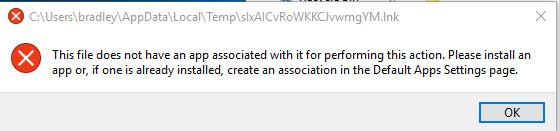
bandicam 2018-07-19 09-12-28-652.jpg

User Feedback

Recommended Comments

Hello, try to reinstall WRobot in new folder and disable your antivirus

miltonbrad

Members
On 7/20/2018 at 2:34 AM, Droidz said:

Hello, try to reinstall WRobot in new folder and disable your antivirus

This issue is still happening and some times it opens up my documents folder.

miltonbrad

Members

im riddled with error and constant crashes.
E] 18:02:51 - ReloggerProfile > KillWRobotProcess(): System.ComponentModel.Win32Exception (0x80004005): Access is denied
   at System.Diagnostics.Process.Kill()
   at Relogger.Classes.ReloggerProfile.KillWRobotProcess()
[E] 18:05:51 - Utility > ResizeAndMoveWindow(Process process, Rectangle rectangle): System.InvalidOperationException: No process is associated with this object.
   at System.Diagnostics.Process.EnsureState(State state)
   at System.Diagnostics.Process.EnsureState(State state)
   at System.Diagnostics.Process.get_MainWindowHandle()
   at .(Process , Rectangle )
[E] 18:06:39 - ReloggerProfile > KillWRobotProcess(): System.ComponentModel.Win32Exception (0x80004005): Access is denied
   at System.Diagnostics.Process.Kill()
   at Relogger.Classes.ReloggerProfile.KillWRobotProcess()
[E] 18:08:43 - Utility > ResizeAndMoveWindow(Process process, Rectangle rectangle): System.InvalidOperationException: No process is associated with this object.
   at System.Diagnostics.Process.EnsureState(State state)
   at System.Diagnostics.Process.EnsureState(State state)
   at System.Diagnostics.Process.get_MainWindowHandle()
   at .(Process , Rectangle )

miltonbrad

Members

nope still didnt fix the issue its still crashing my wows when i start relogger and giving me the same error i always get and its still randomly opening "my documents" folder.

miltonbrad

Members
16 hours ago, Droidz said:

Hello, can you read this: https://wrobot.eu/forums/topic/1381-repairinstall-wrobot/#comment-966 try to install slimdx


Im about to record video of the problem happening just so i can get a fix. i cant use relogger at all cause of this issue and no one in the whole world is having this issue that im having. Its really annoying cause i could be botting alot more then i am doing now but this issue makes relogger not work properly.

miltonbrad

Members

i renamed both updated my relogger.exe and get a fresh one and it still didint fix the issue ?

miltonbrad

Members

Issue is still there ?

Create an account or sign in to comment

Account

Navigation

Search

Search

Configure browser push notifications

Chrome (Android)
  1. Tap the lock icon next to the address bar.
  2. Tap Permissions → Notifications.
  3. Adjust your preference.
Chrome (Desktop)
  1. Click the padlock icon in the address bar.
  2. Select Site settings.
  3. Find Notifications and adjust your preference.